Halloween Costume ideas 2015
Articles by "curve"
@dorothiar #arttips #interview 101 2 Column Template 2012 mentee 2013 2013 mentee 2014 2014 mentee 2014 Portfolio Winner 2014 SCBWI Portfolio Mentorship Winner 2015 mentee 3 Column Template 360 3d 3d print 3d printing 3delight 8bit Abbey McCulloch abstract acryla gouache acrylic action addon adobe Adobe Flash CS3 Adobe Illustrator Advanced Tutorials advection Advertising advice Agata Wierzbicka agents airplane Al Wiseman ALA Alan E. Cober Alan Lee Alex Ross Alexandra Compain-Tissier Alexandra Lekias Alexandra Levasseur Alexandre Korobov Alexis Winter algorithm alien ALT Amelie Hegardt Amit Shimoni amusement an Ana Aranda analog Andrea Hrjnak Andrea Hrnjak andrea offermann andreaoffermann andreazuill Andy Musser Angela DiTerlizzi Angelika Peißker animal logic animals animation animation nodes anime anisculpt Anja Kroencke Anna Higgie Anna Jensen Anna McKay Annabel Briens AnneBerry Anneke Krull Annu Kilpeläinen anstudy anthology António Soares ar arduino area armature arrange array array modifier arrow art art director art directors Art is fun! art reps art tools Artaksiniya arthictecture arthur rackham artists artwork ase Ashlyn Anstee Asian aspiring asset atom attribute attribute transfer audio Audrey Kawasaki augmented reality aurasma Aurelius Battaglia author illustrator automatic automation Autumn Whitehurst avatar Avrom Yanovsky AW14/15 award awards Babeth Lafon Babies baboon Baby Love Background background color bacteria bake baking ball Bamboo banner Banner images banner making Barbara Dziadosz barcode basic bbox beads beats Bec Winnel beginner Bel Johnstone Ben Denison Bernie Fuchs Berto Martinez Beth Krush better photos bge Bijou Karman Bike biscuit bishop black and white black and white art Blair Breitenstein blam blender blender game engine blender3d blending Blinkie Blinky blob blocks Blog Tips blogger Blogging Friends blogs Blonde blur effect in pixlr and photoshop blur images and pictures bmesh bmesh viewer bolognaragazziaward bombing bone bone modeling bones book book launch books boomerang bottle bounding box bowl bpy brian eno brian ormiston Brian Sanders brian won brick bridge Bridget Davies bright Brooke Boynton Hughes build modifier building burns business Buttons bvh cage Caitlin Shearer caldecott calibration camera camera settings camera tips Candle capcom card career Carole Wilmet cartoony Cassandra Rhodin cast Catherine Campbell Cecilia Carlstedt cell center pivot centipede cg cg photography chair challenge Chanel changin color in pixlr changing color chaos character Character Bible character development charcoal charles Charlie Dot Charlie Hebdo Children children's book illustration chocolate Christina Drejenstam christina forshay Christina K christinaforshay Christmas Cindy Derby circle circle dance city cityengine clock clones cloning cloth Cloud based clover CMYK Coco Chanel Cody and the Fountain of Happiness coffee collect collection Collections collision color color balance color cast color correction color mode color study colorful Commercial Use complexity component compositing composition computational thinking computer concept art Condensed Posts conference connect connect the dot connection Connie Lim Conrad Roset constrain constrast contagion content Contest contracts control converter copy copyright Corinna Luyken count Courtney Brims crack Craft craftsmanship Craig & Karl creative creativity creature cricket Cristina Garcia Martin critic criticism critique Crop Crop Tool cross section crowd csv cubism curve curve modifier custom Custom Blog Design Custom Blog Design Tutorial Custom Blog Designers Custom Illustration custom properties Custom Signature custom xml cut cutting plane cycle cycles dae Damien Florébert Cuypers Dan Hillier dance Daniel Egnéus Daniel Segrove Danny Roberts Daren Newman Dasha Tolstikova data data path David Blossom david diaz David Shrigley David Stone Martin Dean Hardscrabble Debbie debbie ohi debbieohi deform deformer degrees deleting background in pixler demo demoscene desaturation of images design design by numbers design process Design Tips dictionaries dictionary Different Text Writing in Pixlr digital digital paint Digital Scrapbook Freebies Digital Scrapbooking disk distance distractions distribute diversion DIY DIY Contest Dolf Veenvliet Doll Doll Bones dolls domino domino effect doodle Doodles door doraemon Doris Jackson Dorothia Rohner dots dpi draw drawing drill driven driver drivers dual versions dummy duplicate duplicates duplication dupliframe dvd dynamic dynamic paint dynamic text E Simms Campbell Easy easy pixlr Easy Tutorials Ed Graham Ed Vebell editing editing photos editors education effect effects ego Eleanor Dalton electric Elia Fernández eliza wheeler Elizabeth Mayville elizawheeler Emily Forgot Emma Zanelli emoticon happy-face Emotional storytelling empathetic characters empty entoforms envy epicycloid EPS Illustration Epson scanner erasers Erin Armstrong Erin Petson erinoshea ernest shepard Esra Roise euler evaluate line Eveline Tarunadjaja evenly spacing vertex event everywhere door exhibition Expandable Posts experiments explode exploded view export expression extrude eye eye color in pixlr eye trick eyeball face rig facial expressions facial setup factory Faiyaz Jafri Families fashion illustration fashion week fcurve feature Featured Fee Harding Feedback fence Fernanda Guedes fibonacci Fifi Lapin file File Types Finalists Finding Nemo fire fix photos Flash Tutorials flicker flip flip flop floor flop flow flower Flowers fnmatch focal point follow up font Fontaine Anderson Fonts food footage For Sale force form formula fractal fracture frame Frames Francois Berthoud Frank Bellamy Frank Furlong Franklin McMahon freckles Fred Steffen FrederiqueBertrand Free for Commercial Use Free for Personal Use Free Stock Photography Free transform tool Freebies Frenchillustration Fritz Siebel frosted mylar fruit ninja Fumi Mini Nakamura Fun function futurism FW2017 fx Gabriel Moreno Gabriella Ibarra game game animation gameart gamma gangnam style Garance Doré Gary Fernandéz gel medium generate generative generator geometric geometry Gerald Lazare Géraldine Georges GIF Gildo Medina Girl Giuseppe Castellano Giveaway glorar goals golden ratio google google docs Google Tools Grant Young graph graphite graphite transfer grease pencil grid group group node growth Gucci Guest Guil Godier gustave dore hair handbook Harper's Bazaar harpercollins Harvey Schmidt Haute Couture head Headers heat map Helena Hauss hexagon hexagonal grid Hiroshi Mizuno Hiroshi Tanabe Holiday Holly Black homology honeycomb hook horror houdini how to how to blur a face or an object in pixlr How to change eye color how to delete an object how to desaturate an image how to edit a image in pixlr how to erase an object how to fix red eye problem how to fix red eyes in pixlt How to fix the parts in pixlr in photoshop How to make a banner in pixlr How to overlap the nevus how to remove a object How to remove an object in pixlr how to remove red eyes How to Remove the Background of an Image in Pixlr How to remove the parts that you don't want in pixlr and photoshop how to replace color How to write a Patterned Text in Pixlr how-to Hsiao-Ron Cheng hsv hue humor Hyshil I love illustration magazine idea ideas Igor+André illusion illustrating illustration illustration board Illustration Books Illustration Intensive Illustration Now! Fashion illustration process Illustrations Illustrative Berlin illustrator Illustrator Intensive Illustrator Tutorials iloveillustration magazine image ediditing lessons Image Ready image sequences image theft imaginative import import text import vertex color improving photos inbetween index visualizer Info Ingrid Bockting ink inktober input Inspiration inspirational quotes install instance instance switching intensive interaction Intermediate Tutorials internet interoperability interpolation intersect intersect edges intersecting intersection interview introduction invoke subprogram io ipad Irana Doucer Isabella Hemmersbach islam islamic iteration Izzie Klingels Jack Hearne Jack Tremblay James Dignan James Gurney japanese Jason Brooks Jean Kim Jeanne Detallante Jen and Chris Creed Photography jen betton Jen Rofé Jenny Mörtsell Jeremy Combot Jeslyn Kate Jesse Auersalo Jessica Jessica Lanan jessicalanan jewellery jewelry jiggle Jim Schaeffing Joe Bowler Joe Cleary Joe Isom Joe Krush Johanna Goodman john maeda John Vernon Lord joint Jordan Sondler JPEG JPG jpop juana martinez-neal juanamartinezneal Judge Judit Garcia Talavera Judith van den Hoek Judy Byron Schachner Jules Julien Julian Beever Julie Verhoeven Jump Break Tool JW Anderson K-Fai Steele Kaethe Butcher Kareem Iliya karel zeman Kate van Harreveld Kathrin Kuhn Kathryn Ault Noble Kathryn Noble Katie Kath kdtree Kei Meguro Kelly Beeman Kelly Light Kelly Smith kelly sonnack Kelly Thompson keyframe keyframing kidlit kidlitartists kimberlygee Kirkus Review Kisoo Chai Kodak Konstantin Kakanias Korean illustration Kotaro Chiba Kozue Himi Kremos Ksenia Finogeeva KT Smail kuler Kustaa Saksi Lanan Laptop larry gritz lasso tool latte lattice Laura Callaghan Laura Laine Lauren Rille layer layering Layla Holzer layout leaf learning learning blender LED Leendert meets Ingrid lego length Leonard Starr lessons levels LFW A/W 14 liangzhu liero lightbox lighting lightning Lina Bodén Lina Ekstrand Linda Dorn line line connect line drawing lines Links Linky Love Linn Olofsdotter Lionel Gilbert Lisa Anchin Lisa Billvik Lisa Krannichfeld lisaanchin lisbeth zwerger Liselotte Watkins list list comprehension List First Last listing locator lofting logo Logo Design Lola Dupré London Fashion Week loop looping loops looptools Lorraine Fox lossless lossy lost weekend lostweekend lotte reininger Louis Glanzman louis vuitton Luciana Rondolini luciograph LULU* lv Lynnie Zulu Mac macgyver macouno maeda Magda Antoniuk magic Magnus Voll Mathiassen mailing mailings maker Makiko Sugawa making banners Malika Favre MAMP mandala manga map map range maplelam mapping Marcel George Maren Esdar Margot Macé Margot van Huijkelom Maribeth Olson Marie El-Ahmar Marilyn Conover Marina Esmeraldo Marine Marbleindex mario Marlies Niemeijer Marsha Riti Martha Rago Martin Krusche Martine Johanna mask masking material materials math matrix matrix apply matryoshka Matt Baker matte medium Matthew Woodson maya maze mdd Meagan Morrison measure megaman Megan Hess Meizhen Xu Mel Crawford memory mentee mentees mentors mentorship program Mercer Mayer Meridth McKean Gimbel mesh mesh cutter meshlab Meta Tags metal gear rising Meyoko Mia Overgaard Micca mice Michael Sanderson Michela Picchi middle grade midi miku Milan milipede minidom Minima Mio Matsumoto mirror cut Misc Miss Blackbirdy miss maple's seeds Miss Take Mitchell Hooks mixamo mixing Mobile Apps mocap mod model modeling modifier modular modulation modulus mold molecule molly idle Molly Ruttan Molly Ruttan Illustration money monitors monkey mono-zero monster monster university morph morpher mosaic mosquito motion motion capture motion capture mouse motion trail moto360 mountain muji Muriel Wood Murray Tinkelman mushroom Music and Podcasts My dead pony Nadia Flower Naiad Einsel Naja Conrad-Hansen Natalie Brockett Natalie Foss nathan vegdahl nautilus Nav Bar navigation needle-felting negotiating Neil Boyle neon nescbwi14 nested New Blogger Questions New Blogger Template Tutorials new user pixlr new year new york New York Fashion week Newbery nicholas nicholas bishop Nicholas Hong Niki Pilkington Niso Ramponi nla No Software node node-based nodebox noise non linear animation Non-Web Font normal Noumeda Carbone npr number NURBS NYFW object object color change object info octopus offset Ola Volo Olaf Hayek old formats opaque projector open movie open shading language open source openshadinglanguage opensoundcontrol optical organization origami original art show Ornaments osc Oscar Schlienger osipa osl outline outliner output Pages paint paint weight painting painting on illustration board painting on wood painting with movie painting with numbers Pair pandas panorama Paper paper lantern parabola parametric parent parenting particle particle info node particles pat david Pat Zietlow Miller pattern Patterned Text Paul Faassen Paul X. Johnson Paula Sanz Caballero PC pdb pebbles pencil Pencil Sketch pencils Penguin perfume perlin Peter Helck Photo CD.8B photo editing software Photo Reference Photobucket photographing art Photographs photography photomerge photoshop Photoshop Brushes Photoshop CS3 Photoshop elements photoshop pixlr desaturaion Photoshop tips Photoshop Tutorials Picture Book Builders picture books Pierre Louis Mascia Piet Paris Pietari Posti pingpong pinnochio pipes pixar pixel pixel art pixel generator pixlr Pixlr advanced Pixlr blog pixlr desaturate keep a colorful part pixlr editting pixlr express Pixlr forum Pixlr free transform Pixlr Lesson Pixlr lessons Pixlr mobile Pixlr resizing images pixlr shortcuts Pixlr tools pixlr tutorial pixlr tutorial with pictures Pixlr Tutorials pixlr white black pixlr.com plant plot plotting ply PNG PNG Illustration podcast point point color pointilism polka dots polyCut polygon Pomme Chan pop-overs portfolio Portfolio award portfolio showcase portfolio-advice portrait position Post Dividers postcard poster Posting pot powdered graphite powerhousemuseum Prada presentation print printmaking Prize procedular procedural process processing programming projection Promotion property prototype PSD psy publishing pulse puppet puppetry pydriver pydrivers pyhandler pyhandlers pyramide python quad quick select set quick tips qumarion Rabbit Moon Rachel Ryle radians radius ramp random random motion randomization randomize range float raspi Ray Houlihan reading reading XML READY-TO-WEAR realflow Rebecca Clarke rebecca dautremer Rebecka Skog rebuild recursive recursivedrawing red eye remove reducing glare reference referencing release remesh modifier remix removal remove remove red eyes remove unwanted objects Removing backgroung render rendering renderman repeat repeater repeating replace replacement replacing color representation rerouter resample resampling research Resizing image resolutions retopology retro review revolve rgb rib Ricardo Fumanal Richard Scarry rig rigging rigify Rikke Jorgensen ring ripple roadkill Robert Heindel Robert J. Lee Robert McCloskey Robert Shore Roberta Zeta Robin Rosenthal robot robotic rocks Rodolfo Montalvo Roller Coaster rotation Rousseau rsl Rubin Pfeffer ruler tool Russ Mills russian rut S/S14 S/S15 S/S16 Sabine Pieper sadako Saftey Pins Sainte Maria Sale Sam Weber Sanda Suy Sandy Kossin santoso Sara Andreasson Sara Singh Sarah Jacoby saturation artist tools scan scanners scanning scatter scbwi SCBWI 2015 mentee SCBWI conference scbwi germany SCBWI mentorship scbwi-la scratch scratchboards screensaver screw screw modifier script scrub sculpting seamless Seamless Patterns Search Engines select by material select by name select by type SEO sequence series set keyframe set keyframes shader shading shadow Shannon Stirnweis shape grammars shape key shapekeys shapes shards shatter Sheilah Beckett shell ship shipping shipwright Shoes SHOWstudio shuffle Sid Barron Sidebar Titles Signature Silja Goetz silkworm Simon and Schuster Simon Varela simple simplicity simulation sine Site Engine Optimization Sjoukje Bierma sketch Sketches sketching skin skin modifier skinning slice slicing slides sloth slow parent smoke smoothstep SN snake Sneek Peek snippet Snow Snow White Snowflakes soccerball social media Social Media Buttons Social Networking society of illustrators Society6 soft body softbody Sonia Menti sound sound wave space spaceship sparta special spider spiderman spiderweb spin spiral Spiros Halaris Spiros Halaris x Urban Decay spline Spot Healing Tool spreadsheet SS16 stack stacking stair stamp Stan Galli star starfish stencyl step Steven G. Dobson still Stina Persson stone stones storytelling strand strand info strands street art string stripes structure studies studio style stylistic summary Summary Posts Summer sun supplies surface Susan Farrington suzanne Suzanne Kaufman sverchok swatch switch sydney system table table of contents take out background Tal Drori tangent tangled Taschen teaching teapot Template Templates tentacle Tess Jacobson Tex Avery text text editor Text Formats Text Styles in Pixlr texture texturing The Cartorialist The Grudge Keeper The Purple Book thinker1 Thomas B. Sawyer thread TIFF tile tilecam tiling time time code Tina Berning Tina Kugler tips tips for artists Toby Neilan Tom Baxter Tom Bjarnason tombow tomie depaola tool tools topology tower Tracy Turnbull Train transfer drawing transferring sketch transform transformation transit travel triangle wave Tricia Springstubb trigger tris tristan lock tube tubes Tutorials twitter type tool typeface typography unbake unity3d universal unquad utah uv valentine Valentino Valerie Servais vanilla variable variation variety vase vector vectorized Velwyn Yossy venus Veronica Ballart Lilja vertex vertex color vertex group vertex paint vertex weight VFX Victoria Boysen video Videos viewer Vintage virtual virtual studio visualization vivid vividfestival VOGUE volumetric voronoi Vote voxel voxelated voxelation walking teapot Walter Einsel wand tool water soluble graphite watercolor wav wave we need diverse books web webbing Week Themes weight welcome Wendy magazine Wendy Plovmand what casues red eyes What is Pixlr Wherever You Go Wide Awake Bear wiggle Will Davies Winner Winnie Fitch Winnie Truong Winter wire wired wireframe wolfram Woman wood woodwork wool wooly wordpress work workflow World writing writing XML www.pixlr.com XML YA yayoi kusama Yelena Bryksenkova yoda Yoko Furusho Yuliya zaha hadid zen zsphere


I like to really explore Splines using Animation Nodes (AN).

Splines aka Curves is often the odd one, the one that do not get much attention these days because the popularity of Polygon mesh. Luckily, I started 3D by learning about NURBS and Curves and Surfaces in Maya, so I kind of have an equal love between Curves and Polygons (!).

In Blender, Curves object is a special one (just like Text object or Metaballs). It's more than just a curve, it can "morph" into lots of other objects really quickly via Modifiers or other ways.


In order to really understand Curves, we need to look at it slowly and thoroughly.

The Simplest Curve...

.... is made of 2 Points.

I am using Sverchok point index viewer because as far as I know, Blender is not showing points in Object level, needs to go to Edit mode, but that's a hassle.

Two points will create a (straight) Line. Blender case, we need to care whether it is a Poly object or Bezier object.

"Spline from Points" node does the hard job, connecting the dots. But you may notice automatically created "Create List" node.


To be honest, I personally don't care about the naming, but I believe "Poly" curve is linear and always create straight lines. While Bezier is curvy.

Ok, next, when we have more than 2 points, we can start to have interesting shapes. And we can care whether it is "Cyclic" or NON "Cyclic".

Cyclic just means that the last point will make a close loop of the Curves (like a closed Circle), while Non-Cyclic means the curve is open, no connected lines between first points and last point.

Non Cyclic Curve
Cyclic Curve

Appending Point(s)


You can Append Point to Spline using that exact node like above. Soon you will realize that AN create these "Create List" node and "Get List Element" node quite often. A little confusing may be, even for me. But there might be a reason behind it, perhaps inside a single Curve object, we can have multiple Splines to create surface? Maybe. Something to keep in mind.

Anyways, we keep "Append Point" in mind, in case we like to extend a curve (?)

UPDATE CORRECTION FROM JACQUES:

You were right this Spline list is because a curve object in Blender can hold multiple splines.
Nevertheless these extra get list element and create list node are redundant. You should manipulate the spline first and then create the list from it. 

What you did there is:
making a spline -> make a list with that spline -> take the spline out of the list -> append a point -> create the list again -> set the spline list on the curve object

Instead it should be:
making a spline -> append a point -> create the list -> set the spline list on the curve object


Random Vector Points Generators >>> Curve


Random Vector node can be used to generate random point positions, that feeds into the Curve.

Wiggle Points >>> Curve

Like wise, Wiggle Points node, special node that generate wiggly points over time, also can be fed to generate Curve.


Sometimes, in order to really understand what's happening, it's better to see in 2D what's really happening. So, let say we are looking through the Front camera, only Z is wiggling, Y is all zero, and X equals to "index" (0, 1, 2, 3, 4...) we can see more clearly the wiggly lines.


JACQUES: Use Wiggle Number node! Simpler! It exists!

Smoothing the Curve

Below you see node called "Smooth Bezier Spline" node that can help to create a smooth curve. Based on the Wiggly line above.


Make sure you set to "Bezier" for the Spline from Points.

Revolve Curves

Let's jump into another topic using Curves: to create DONUT shape by revolving Circle using another Circle.

Below is probably one of simplest example. It generates a Donut shape, but really depends on how you orient the 2 Curves.


TEMPLATE: Distribute Instances on Spline

There is a fun template you can try to instance many duplicates of X objects, along Curve. This is actually one feature that Blender does not have but made possible using AN because of the node setup and this is actually useful.


Animating Instances along Curve

Supposed we have a bunch of Torus along Circle curve.


Knowing that each one of duplicate instances are in order, we can use the Index to push and offset delay every instance.


NODE: Get Spline Samples

Using this node called "Get Spline Samples", similar to template above, we can place locate object directly along curve, and also know the orientation.


NODE: Spline From Edges


Another handy node is to generate Splines, that is based on Polygon Edges. This conversion from Mesh to Curve is LIVE, so if the mesh is changing, the curve is also changing.


Lofting Splines

If you ever loft a bunch of splines to create a mesh, the process can be less destructive this way.


Blender Polygon object is usually easier to work with, than Splines/Curves (I think) so sometimes maybe you want to do something like below where we have bunch of polygon edges, and we like to LOFT it into a surface.


There are plenty more topics we can talk about Splines, but that's probably enough for now. Save the rest for some other times.

If you are somewhat new to Blender and 3D, Mesh Edges and Spline Curves are two different things but each can be related to each other. Just like Vector and Point Positions, are two different data type, however can be used interchangeable sometimes.


And as always, knowing the fact that you suddenly have so many controls over many things can be overwhelming. If not careful, creating chaotic mesh is only a node away.


Here is the continuation of Snippets Series for Sverchok Add-On.

Thanks to Zeffii, Linus and Nikitron, we are getting more nodes and lots of hidden improvements. Such as the usage of NUMPY in Sverchok code that can give performance boost and more.

Blender is also expecting improvement in NURBS Modeling that will probably give a boost of usability of Sverchok, which can be more support for NURBS creation.

Lots of new nodes, All for Glory of Curves and Surfaves. Still simple nodes, but nice addition to the family.

Get Group by Name and Get Vertex Groups DATA

  • NEW Objects In (added since 20140602)
  • List Item 
The new Objects In node understand GROUP (if we specify the name and press GET), and further more we can also get the Vertex Groups DATA if we check the "Vertex Groups" option.


Vers_grouped OUT SOCKET gives us the List of Vertex Number from the Vertex Group. So we could actually use List Item NODE to get those vertices. In Python, this is equivalent to getting item inside a list using its index number.


  • List Item for EDGE DATA
  • List Item for VERTEX DATA
  • Formula2
Below, we are loading Group Item specifically by its index value using Formula2 node.


UPDATE:

Check out NIKITRON more advanced example with VERTEX GROUP, there is BLEND in the commend below.

Preview:


Get Nurbs Surface and Curve DATA

Yes! NURBS object is now respected and can be loaded into Sverchok! We don't have option for resampling (yet), but one just need to be patient and keep hoping.

I have almost totally ignored the NURBS Curve and Surface functionality in Blender. Well, actually I like the Curve Object in Blender. I have mentioned it in the past. That's because Curve can do this:


NOTE: 
Sverchok Get Curve does not seem to load the Curve Object DATA fully. Such as this conversion as extrude is not yet working. So there are limitations. But Curve => Poly Edge is working already for now.

ZEFFI UPDATE:
Curve Object Extrude is now respected as Mesh inside Sverchok via Object In!


TIPS: Don't forget we can use Grease Pencil => Curve, and then get the Curve into Sverchok. Sverchok Get Curve is good for Curve Edges, for now.

If you use Grease often, you might want to have Smooth Stroke and Simplify Stroke to be ON from Blender User Preferences:


NURBS LOFTING IN SVERCHOK


  • List Flip
  • Interpolation (Cubic) (NEW)
  • Line Connect

This snippet is really from Nikitron, this is how you can do LOFTING in Blender!

NURBS CURVES => SVERCHOK => LOFTED MESH

Very exciting and useful. In one side, we can see what is going on in creating such Mesh. Then, apart from obvious practical usage, side, we really have additional Parametric control over the resulting mesh.


UPDATED NODE:


Making Procedural Fence, Bridge, Road, Train Tracks is actually a lot easier now to think about it!

"Perlin Noise Vase" (2014) --- we all need 3D printing!

INSTANT RETOPOLOGY!


Nikita supplied this example of INTERPOLATION:


FROM TEXT OBJECT, GET THE OUTLINE ONLY

  • Bisect

PROBLEM:
When we use (LIVE) Text Object into Sverchok, we are getting a triangulated mesh (this is very old school). Normally we want to have a cleaner N-Gon Faces.


SOLUTION:
There are probably plenty of solutions. But Zeffii gave a solution like this: Extrude the Text Object twice, and get the middle part. Nikita also help with this by using Bisect node. Supposedly we can get a nicer N-Gon type of Text.

Currently the result is not 100% perfect, as it does not work with Letter that is made up of Compound. Well, pretty close for now. 


Having a LIVE Text Object, means we can easily change the INPUT by editing the Text.

Then, we can further do something with it like Wiggle Text Outline:


And then Skin Modifier.


You can also "cleaning up" Text Object Mesh this way using Remesh Modifier:

Polygons can't have gaps in BMesh. So if an Ngon face has a gap, it's always split somewhere.


For now, we have to settle this "issue" using Text Object => Curve conversion => Sverchok => Mesh. Less immediate result, and one manual step, but I think it was not too bad.

The "issue" is not with Sverchok, but with Blender Text Object that is still using the old school way of Mesh Conversion and giving Triangulated result, instead of clean N-Gon mesh.

REQUEST:
Dear Blender Developer, can we make it so that when Text => Mesh, it does not get triangulated? Maybe something that is more planar or remesh style. Thank you.

Wishlist is to be able to have something like this:

Snapshot from Maya Text.

Procedural Centipede in Blender.

I am a little bit side-tracked, but I still want to think Pixar and procedural monster. I will focus on one character: Dean Hardscrabble.


UPDATE 2013.10.15:
Watch also this video:
http://youtu.be/kuAsOyzawNY

This lady here, according to Pixar Wikia, is based on creepy crawling insect, the Centipede:
"Dean Hardscrabble’s character was modeled after a type of centipede called Scolopendra Gigantea, also known as the Amazonian giant centipede."
http://pixar.wikia.com/Dean_Hardscrabble


MODELING CENTIPEDE PROCEDURALLY

I wonder which one is actually more "tricky" to create, maybe each one gives different challenges:
  • Procedural Insects
  • Procedural Monster
  • Procedural Human (Biped)
  • Procedural Anime Character
  • Procedural Human Heads
In this post, I may not have 100% solution, but I will take you through the process of thinking. We will look at example inside and outside Blender.

Creatures like Centipede or similar kind (like Millipede, Maggots) is a type of creature that is truly perfect for Procedural Modeling and Animation. Many other insects like ants, spiders, butterflies, dragonflies, Trilobite, etc, are all very interesting to study and model procedurally because they can be reduced to "primitives and parts".

GREAT EXAMPLE: Procedural Spiders by Esther Zuidgeest - Houdini
http://www.youtube.com/watch?v=2b11iiBjS9Y

3D printed Octopod Robot:
http://www.youtube.com/watch?v=HfiHOpv6HtI

Let's look at Pixar's Dean Hardscrabble again. She is modeled quite "realistically" based on Centipede especially her lower part of body/torso and legs. While her face and wings, are more like Dragon. It is a very interesting in term of design. I do not 100% agree with the wings, but flying crawling creature is pretty "scary" monster, I guess.

http://www.youtube.com/watch?v=ySapzrgfImc

This character may seems simple, but she is certainly not "simple" when we really look at every details. This is what makes a Pixar: a simple character but complex shadings.

I guess we can focus on the Dean's CENTIPEDE's SPINE and LEGS parts for now...

CENTIPEDE SPINE AND LEGS

If we are to model such creature with many repeating legs in Blender, how would we do it?

There are many techniques that I could think of. Not just Skin Modifier, but many others as well.

Below are some of the list of Blender features that might be useful to model a Centipede SPINE AND LEGS:
  • Skin Modifier
  • Grease Pencil
  • Curve Object
  • Curve Modifier
  • Array Modifier
  • Joint Sketching
  • Blender Particle Intancing
  • Python + NumPy and MathPlotLib stuffs
  • Dupliverts or Dupliframes or Dupliface
I actually found a lot of other interesting informations (that is not totally related to Centipede modeling) while observing this idea of modeling and creating a Centipede using Blender. 

SKIN MODIFIER: VERTICE RADIUS AND PYTHON  = SPINE PART
Yesterday, I have a bit of exploration of Skin Modifier but from Python context.

I am always curious with how we can access the "weight" of each point (vertex) of Skin Modifier via Python. You know, kind of like when we apply Skin Modifier to an edge, go to Edit Mode, and do Ctrl+A for some vertices to Scale the Radius size of each segment.

I did Google Search everywhere, and the only clue is this blog post:

It mentions about Skin Vertice and Radius.


I also asked the same question at Blender Stack Exchange, and thanks to answer by Dealga aka Zelffi (Blender Scripting guy), this became very clear:

What more interesting is that there is not actually 1 Value for Radius Weight Value for each vertex, but a set of 2 Values:

import bpy

# Get selected mesh with Skin Modifier applied
skin = bpy.context.active_object.data.skin_vertices[0].data

# Iterate every point/vertex and get/set the Radius

for i, v in enumerate(skin):
    print ("vertex", i, v.radius[0], v.radius[1])

    # Change the Radius Value for all vertices
    v.radius[0] = v.radius[1] = 2.0

Give the code above a try to understand what I mean. The above code will do 2 main things:
1. Printing out the values of Vertex Radius (2 values)
2. Setting the radius of every vertex to certain value (if you like).

By default, apparently the Radius is set to (0.25, 0.25). Remember, there are 2 values for each vertex.

Now, do you know that we can constraint Blender Skin Modifier in one axis X or Y, apart from its ability to scale in both axis proportionally? All this time and I only found out about this feature today!

Flat Skin Modifier
This means, we can create a FLAT MESH, instead of Boxy or Sausage like MESH (when subdivided). A BIG revelation!

This means, we can model Australian Boomerangs with a minimum of 2 Edges + Skin Modifier:

Australian Boomerang
Modern plastic boomerang toy.

We can also create all sorts of wooden Paper Airplanes:


3D printing Paper Airplanes? Why not. Unfortunately, I don't have 3D printer at the moment.

Anyways, it is really quite interesting that we can actually create "flat mesh" based on Skin Modifier.

MANUAL: Go to Edit Mode (TAB), select vertice(s), do the usual CTRL+A then constraint in X or Y axis, using Shift+X or Shift+Y to adjust the Radius.

INFO: This is a bit Similar to Blender Curve Object
The Skin Modifier ability to have 2 x Radius is equivalent to Blender Curve Object, in its ability to set Feather Radius that will affect the Extrude property.

Curve Object also has special Tilt attribute for each point and this is not built in inside Skin Modifier. 

Procedural Drill using Curve Object ONLY by adjusting the Tilt.
import bpy

# Make Tilting Curve Spiral based on Curve

# you need to select NURBS object first
curve = bpy.context.active_object.data

# get points

points = curve.splines[0].points

for i, point in enumerate(points):
    # tilt X degree of every points of curve
    point.tilt = i * 2 # 2 degree tilt

However, I am guessing that we can always use Armature Skinning and Twisting. We probably can try that at some point in the future.

BACK TO CENTIPEDE PROCEDURAL MODELING...

I like the Skin Modifier solution, because it is very robust. Of course, Skin Modifier is only the base model, but it can be easily repeated and adjustable along the way before we commit to any parts of the Centipede.

One QUIRKY thing about Skin Modifier, in relation to the original Edge is that we don't always get Vertex Indices that is in order. Unless you create the Edge properly.

This is quite strange for me at first. I found this quirk when I try to create CONE Tentacle like object using Skin Modifier and Python. 

You can check Vertex Index in  two ways:
1. Using Python in Edit Mode

2. Using Blender App Debug mode
Activate debug mode:
bpy.app.debug = True

Go to Edit Mode and select Vertices with Indices option checked.


My tips when modeling Edges for Skin Modifier is like this:
1. Start with Cube or other mesh.
2. Go to Edit Mode, merge At Center. So you have a single Vertex now.
3. Instead of Extruding, use CTRL + Click, Click, Click method instead.

Why? The reason is the Vertex Index Order will be different. The one with CTRL+Click, Click, Click method will guarantee to have a nice sorted index from 0 (beginning) to end number.


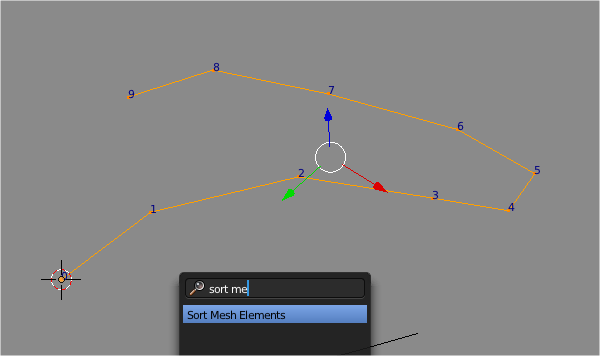
Of course you can always sort the mesh using Sort Mesh Elements operator, but it is always better to do it right the first time. So remember to use CTRL+Click, Click, Click method when you are creating edges for Skin Modifier. I know, it is tempting to just extrude.

UPDATE 2013.07.10 Correction: Ctrl+Click,Click,Click and Extrude Vertex give no different.

Regarding the CTRL+Click,Click,Click method OR Extrude Vertex, both will actually give same result. Let say you start with a single vertex. When you extrude you get 2 vertices with index 0 and 1. If you continue to extrude right away, you will get Vertex Order Index List like below:
0,1 (original edge)
0,2,1
0,2,3,1
0,2,3,4,1
0,2,3,4,5,1
0,2,3,4,5,6,1

You got the idea. The sorting is not right.

In order so that you have a nice ordering, you start with a single vertex in edit mode, extrude it once so you have an edge to start with. Then go out of Edit Mode to Object Mode. Jump back to Edit mode, now you can extrude from vertex index 1, and the index list is now properly sorted:
0,1
0,1,2
0,1,2,3
0,1,2,3,4
0,1,2,3,4,5

The advantage of having an edge with sorted vertex index is the ability to re-arrange mesh as you like.

Number Pattern to rearrange edge into any kind of curve you like. 

Number Pattern to re-arrange pre-existing Edge.
Maybe one day, we can go deeper into low level Point Vertex and using Algorithm to arrange points using complex Math.

Having this information will ensure that later on when we use Python to modify the RADIUS of each Skin Vertice, everything will be as we expect it. Such as if we create a Tentacle kind of object, we want the radius to go from MIN to MAX value, and with vertex order correctly sorted, we can easily adjust the radius using Python.

Sorting matters can be complicated, if you want to read some, I think this blog post is related:

I think, in the future, when I have better grasp of Python, we can really Procedurally code the creation of Centipede.

BLENDER ARMATURE: Skeleton Sketching  = SPINE PART

In my research on creating Procedural Centipede, I also encounter this super interesting Blender feature that easily overlooked: Skeleton Sketching.


This feature is also quite interesting and potentially useful in relation to modeling or rigging: Tentacle, Snake, Tail, or Centipede.

Remember my old talk about Curve Resampling or finding a way to place objects evenly in a Curve Path? Well, I think this Skeleton Sketching might actually be useful to do that.

We will keep this Skeleton Sketching for future usage.

DUPLIFACE/DUPLIVERT/DUPLIFRAME: Spine or Leg Part
These features of Blender is always kind of interesting and handy for a lot of reasons. Even for Centipede. You definitely want to study this feature on your own:

Pablo Lizardo creating Array of Rooftop Tiles:
http://www.youtube.com/watch?v=yso0RC9hqoI&feature=youtu.be

BLENDER GREASE PENCIL: Drawing Curve = SPINE PART
Grease Pencil is also potentially nice to draw Centipede Backbone/Spine. Always keep Grease Pencil handy for all situation. When we convert Grease Pencil to Curve, it will have nicely sorted index too. 

MODIFIER: Array Modifier and Curve Modifier  = LEG PART

The final key here is to use Array Modifier, Curve Modifier, and a Curve in order to duplicate legs of centipede along the Spine path.


The result:


Ok, now, we have pretty must the foundation of how to model Centipede Procedurally using Blender.

DETAILING AND FURTHER REFINEMENT

We are not finished, this is in fact, just only covering the base.

You can continue to refine the model by Sculpting, but I think with the Skin Modifier for the body, for example, we can probably first create Segmented lines using Python script.

For example, something like below:

ADJUST RADIUS FOR EVERY N VERTICES

import bpy

# Get selected mesh with Skin Modifier applied
skin = bpy.context.active_object.data.skin_vertices[0].data

# Iterate every point/vertex and get/set the Radius

for i, v in enumerate(skin):
    print ("vertex", i, v.radius[0], v.radius[1])

    # Change the Radius Value for all vertices
    
    v.radius[0] = v.radius[1] = 0.5
    
    # Change the Radius Value for every N vertices
    if(i % 2):
        v.radius[0] = v.radius[1] = 1


With Displace Modifier and Noise Texture.

JOINING THE LEGS INTO EACH SEGMENTS OF SPINE

If we later want to JOIN every leg segment back into the body, we can also use Python scripting.

This makes me think: maybe the whole thing can be scripted too? I bet it can. Normally for "procedural" stuff, where everything is repeated and can be solved by step by step procedure, things can be scripted.

Let say we do it another way. we firset created an Array of Edges that makes a pair of legs, then we connect the center point of every pair of legs using Python, that might possibly works as well.


RIGGING AND ANIMATING CENTIPEDE

Continue on, if we are to rig the Centipede for animation, we probably want to use Drivers to control the movement of the legs.

GAKKEN MECHAMO CENTIPEDE ROBOT

MKRdezign

Contact Form

Name

Email *

Message *

Powered by Blogger.
Javascript DisablePlease Enable Javascript To See All Widget