Halloween Costume ideas 2015
Articles by "hair"
@dorothiar #arttips #interview 101 2 Column Template 2012 mentee 2013 2013 mentee 2014 2014 mentee 2014 Portfolio Winner 2014 SCBWI Portfolio Mentorship Winner 2015 mentee 3 Column Template 360 3d 3d print 3d printing 3delight 8bit Abbey McCulloch abstract acryla gouache acrylic action addon adobe Adobe Flash CS3 Adobe Illustrator Advanced Tutorials advection Advertising advice Agata Wierzbicka agents airplane Al Wiseman ALA Alan E. Cober Alan Lee Alex Ross Alexandra Compain-Tissier Alexandra Lekias Alexandra Levasseur Alexandre Korobov Alexis Winter algorithm alien ALT Amelie Hegardt Amit Shimoni amusement an Ana Aranda analog Andrea Hrjnak Andrea Hrnjak andrea offermann andreaoffermann andreazuill Andy Musser Angela DiTerlizzi Angelika Peißker animal logic animals animation animation nodes anime anisculpt Anja Kroencke Anna Higgie Anna Jensen Anna McKay Annabel Briens AnneBerry Anneke Krull Annu Kilpeläinen anstudy anthology António Soares ar arduino area armature arrange array array modifier arrow art art director art directors Art is fun! art reps art tools Artaksiniya arthictecture arthur rackham artists artwork ase Ashlyn Anstee Asian aspiring asset atom attribute attribute transfer audio Audrey Kawasaki augmented reality aurasma Aurelius Battaglia author illustrator automatic automation Autumn Whitehurst avatar Avrom Yanovsky AW14/15 award awards Babeth Lafon Babies baboon Baby Love Background background color bacteria bake baking ball Bamboo banner Banner images banner making Barbara Dziadosz barcode basic bbox beads beats Bec Winnel beginner Bel Johnstone Ben Denison Bernie Fuchs Berto Martinez Beth Krush better photos bge Bijou Karman Bike biscuit bishop black and white black and white art Blair Breitenstein blam blender blender game engine blender3d blending Blinkie Blinky blob blocks Blog Tips blogger Blogging Friends blogs Blonde blur effect in pixlr and photoshop blur images and pictures bmesh bmesh viewer bolognaragazziaward bombing bone bone modeling bones book book launch books boomerang bottle bounding box bowl bpy brian eno brian ormiston Brian Sanders brian won brick bridge Bridget Davies bright Brooke Boynton Hughes build modifier building burns business Buttons bvh cage Caitlin Shearer caldecott calibration camera camera settings camera tips Candle capcom card career Carole Wilmet cartoony Cassandra Rhodin cast Catherine Campbell Cecilia Carlstedt cell center pivot centipede cg cg photography chair challenge Chanel changin color in pixlr changing color chaos character Character Bible character development charcoal charles Charlie Dot Charlie Hebdo Children children's book illustration chocolate Christina Drejenstam christina forshay Christina K christinaforshay Christmas Cindy Derby circle circle dance city cityengine clock clones cloning cloth Cloud based clover CMYK Coco Chanel Cody and the Fountain of Happiness coffee collect collection Collections collision color color balance color cast color correction color mode color study colorful Commercial Use complexity component compositing composition computational thinking computer concept art Condensed Posts conference connect connect the dot connection Connie Lim Conrad Roset constrain constrast contagion content Contest contracts control converter copy copyright Corinna Luyken count Courtney Brims crack Craft craftsmanship Craig & Karl creative creativity creature cricket Cristina Garcia Martin critic criticism critique Crop Crop Tool cross section crowd csv cubism curve curve modifier custom Custom Blog Design Custom Blog Design Tutorial Custom Blog Designers Custom Illustration custom properties Custom Signature custom xml cut cutting plane cycle cycles dae Damien Florébert Cuypers Dan Hillier dance Daniel Egnéus Daniel Segrove Danny Roberts Daren Newman Dasha Tolstikova data data path David Blossom david diaz David Shrigley David Stone Martin Dean Hardscrabble Debbie debbie ohi debbieohi deform deformer degrees deleting background in pixler demo demoscene desaturation of images design design by numbers design process Design Tips dictionaries dictionary Different Text Writing in Pixlr digital digital paint Digital Scrapbook Freebies Digital Scrapbooking disk distance distractions distribute diversion DIY DIY Contest Dolf Veenvliet Doll Doll Bones dolls domino domino effect doodle Doodles door doraemon Doris Jackson Dorothia Rohner dots dpi draw drawing drill driven driver drivers dual versions dummy duplicate duplicates duplication dupliframe dvd dynamic dynamic paint dynamic text E Simms Campbell Easy easy pixlr Easy Tutorials Ed Graham Ed Vebell editing editing photos editors education effect effects ego Eleanor Dalton electric Elia Fernández eliza wheeler Elizabeth Mayville elizawheeler Emily Forgot Emma Zanelli emoticon happy-face Emotional storytelling empathetic characters empty entoforms envy epicycloid EPS Illustration Epson scanner erasers Erin Armstrong Erin Petson erinoshea ernest shepard Esra Roise euler evaluate line Eveline Tarunadjaja evenly spacing vertex event everywhere door exhibition Expandable Posts experiments explode exploded view export expression extrude eye eye color in pixlr eye trick eyeball face rig facial expressions facial setup factory Faiyaz Jafri Families fashion illustration fashion week fcurve feature Featured Fee Harding Feedback fence Fernanda Guedes fibonacci Fifi Lapin file File Types Finalists Finding Nemo fire fix photos Flash Tutorials flicker flip flip flop floor flop flow flower Flowers fnmatch focal point follow up font Fontaine Anderson Fonts food footage For Sale force form formula fractal fracture frame Frames Francois Berthoud Frank Bellamy Frank Furlong Franklin McMahon freckles Fred Steffen FrederiqueBertrand Free for Commercial Use Free for Personal Use Free Stock Photography Free transform tool Freebies Frenchillustration Fritz Siebel frosted mylar fruit ninja Fumi Mini Nakamura Fun function futurism FW2017 fx Gabriel Moreno Gabriella Ibarra game game animation gameart gamma gangnam style Garance Doré Gary Fernandéz gel medium generate generative generator geometric geometry Gerald Lazare Géraldine Georges GIF Gildo Medina Girl Giuseppe Castellano Giveaway glorar goals golden ratio google google docs Google Tools Grant Young graph graphite graphite transfer grease pencil grid group group node growth Gucci Guest Guil Godier gustave dore hair handbook Harper's Bazaar harpercollins Harvey Schmidt Haute Couture head Headers heat map Helena Hauss hexagon hexagonal grid Hiroshi Mizuno Hiroshi Tanabe Holiday Holly Black homology honeycomb hook horror houdini how to how to blur a face or an object in pixlr How to change eye color how to delete an object how to desaturate an image how to edit a image in pixlr how to erase an object how to fix red eye problem how to fix red eyes in pixlt How to fix the parts in pixlr in photoshop How to make a banner in pixlr How to overlap the nevus how to remove a object How to remove an object in pixlr how to remove red eyes How to Remove the Background of an Image in Pixlr How to remove the parts that you don't want in pixlr and photoshop how to replace color How to write a Patterned Text in Pixlr how-to Hsiao-Ron Cheng hsv hue humor Hyshil I love illustration magazine idea ideas Igor+André illusion illustrating illustration illustration board Illustration Books Illustration Intensive Illustration Now! Fashion illustration process Illustrations Illustrative Berlin illustrator Illustrator Intensive Illustrator Tutorials iloveillustration magazine image ediditing lessons Image Ready image sequences image theft imaginative import import text import vertex color improving photos inbetween index visualizer Info Ingrid Bockting ink inktober input Inspiration inspirational quotes install instance instance switching intensive interaction Intermediate Tutorials internet interoperability interpolation intersect intersect edges intersecting intersection interview introduction invoke subprogram io ipad Irana Doucer Isabella Hemmersbach islam islamic iteration Izzie Klingels Jack Hearne Jack Tremblay James Dignan James Gurney japanese Jason Brooks Jean Kim Jeanne Detallante Jen and Chris Creed Photography jen betton Jen Rofé Jenny Mörtsell Jeremy Combot Jeslyn Kate Jesse Auersalo Jessica Jessica Lanan jessicalanan jewellery jewelry jiggle Jim Schaeffing Joe Bowler Joe Cleary Joe Isom Joe Krush Johanna Goodman john maeda John Vernon Lord joint Jordan Sondler JPEG JPG jpop juana martinez-neal juanamartinezneal Judge Judit Garcia Talavera Judith van den Hoek Judy Byron Schachner Jules Julien Julian Beever Julie Verhoeven Jump Break Tool JW Anderson K-Fai Steele Kaethe Butcher Kareem Iliya karel zeman Kate van Harreveld Kathrin Kuhn Kathryn Ault Noble Kathryn Noble Katie Kath kdtree Kei Meguro Kelly Beeman Kelly Light Kelly Smith kelly sonnack Kelly Thompson keyframe keyframing kidlit kidlitartists kimberlygee Kirkus Review Kisoo Chai Kodak Konstantin Kakanias Korean illustration Kotaro Chiba Kozue Himi Kremos Ksenia Finogeeva KT Smail kuler Kustaa Saksi Lanan Laptop larry gritz lasso tool latte lattice Laura Callaghan Laura Laine Lauren Rille layer layering Layla Holzer layout leaf learning learning blender LED Leendert meets Ingrid lego length Leonard Starr lessons levels LFW A/W 14 liangzhu liero lightbox lighting lightning Lina Bodén Lina Ekstrand Linda Dorn line line connect line drawing lines Links Linky Love Linn Olofsdotter Lionel Gilbert Lisa Anchin Lisa Billvik Lisa Krannichfeld lisaanchin lisbeth zwerger Liselotte Watkins list list comprehension List First Last listing locator lofting logo Logo Design Lola Dupré London Fashion Week loop looping loops looptools Lorraine Fox lossless lossy lost weekend lostweekend lotte reininger Louis Glanzman louis vuitton Luciana Rondolini luciograph LULU* lv Lynnie Zulu Mac macgyver macouno maeda Magda Antoniuk magic Magnus Voll Mathiassen mailing mailings maker Makiko Sugawa making banners Malika Favre MAMP mandala manga map map range maplelam mapping Marcel George Maren Esdar Margot Macé Margot van Huijkelom Maribeth Olson Marie El-Ahmar Marilyn Conover Marina Esmeraldo Marine Marbleindex mario Marlies Niemeijer Marsha Riti Martha Rago Martin Krusche Martine Johanna mask masking material materials math matrix matrix apply matryoshka Matt Baker matte medium Matthew Woodson maya maze mdd Meagan Morrison measure megaman Megan Hess Meizhen Xu Mel Crawford memory mentee mentees mentors mentorship program Mercer Mayer Meridth McKean Gimbel mesh mesh cutter meshlab Meta Tags metal gear rising Meyoko Mia Overgaard Micca mice Michael Sanderson Michela Picchi middle grade midi miku Milan milipede minidom Minima Mio Matsumoto mirror cut Misc Miss Blackbirdy miss maple's seeds Miss Take Mitchell Hooks mixamo mixing Mobile Apps mocap mod model modeling modifier modular modulation modulus mold molecule molly idle Molly Ruttan Molly Ruttan Illustration money monitors monkey mono-zero monster monster university morph morpher mosaic mosquito motion motion capture motion capture mouse motion trail moto360 mountain muji Muriel Wood Murray Tinkelman mushroom Music and Podcasts My dead pony Nadia Flower Naiad Einsel Naja Conrad-Hansen Natalie Brockett Natalie Foss nathan vegdahl nautilus Nav Bar navigation needle-felting negotiating Neil Boyle neon nescbwi14 nested New Blogger Questions New Blogger Template Tutorials new user pixlr new year new york New York Fashion week Newbery nicholas nicholas bishop Nicholas Hong Niki Pilkington Niso Ramponi nla No Software node node-based nodebox noise non linear animation Non-Web Font normal Noumeda Carbone npr number NURBS NYFW object object color change object info octopus offset Ola Volo Olaf Hayek old formats opaque projector open movie open shading language open source openshadinglanguage opensoundcontrol optical organization origami original art show Ornaments osc Oscar Schlienger osipa osl outline outliner output Pages paint paint weight painting painting on illustration board painting on wood painting with movie painting with numbers Pair pandas panorama Paper paper lantern parabola parametric parent parenting particle particle info node particles pat david Pat Zietlow Miller pattern Patterned Text Paul Faassen Paul X. Johnson Paula Sanz Caballero PC pdb pebbles pencil Pencil Sketch pencils Penguin perfume perlin Peter Helck Photo CD.8B photo editing software Photo Reference Photobucket photographing art Photographs photography photomerge photoshop Photoshop Brushes Photoshop CS3 Photoshop elements photoshop pixlr desaturaion Photoshop tips Photoshop Tutorials Picture Book Builders picture books Pierre Louis Mascia Piet Paris Pietari Posti pingpong pinnochio pipes pixar pixel pixel art pixel generator pixlr Pixlr advanced Pixlr blog pixlr desaturate keep a colorful part pixlr editting pixlr express Pixlr forum Pixlr free transform Pixlr Lesson Pixlr lessons Pixlr mobile Pixlr resizing images pixlr shortcuts Pixlr tools pixlr tutorial pixlr tutorial with pictures Pixlr Tutorials pixlr white black pixlr.com plant plot plotting ply PNG PNG Illustration podcast point point color pointilism polka dots polyCut polygon Pomme Chan pop-overs portfolio Portfolio award portfolio showcase portfolio-advice portrait position Post Dividers postcard poster Posting pot powdered graphite powerhousemuseum Prada presentation print printmaking Prize procedular procedural process processing programming projection Promotion property prototype PSD psy publishing pulse puppet puppetry pydriver pydrivers pyhandler pyhandlers pyramide python quad quick select set quick tips qumarion Rabbit Moon Rachel Ryle radians radius ramp random random motion randomization randomize range float raspi Ray Houlihan reading reading XML READY-TO-WEAR realflow Rebecca Clarke rebecca dautremer Rebecka Skog rebuild recursive recursivedrawing red eye remove reducing glare reference referencing release remesh modifier remix removal remove remove red eyes remove unwanted objects Removing backgroung render rendering renderman repeat repeater repeating replace replacement replacing color representation rerouter resample resampling research Resizing image resolutions retopology retro review revolve rgb rib Ricardo Fumanal Richard Scarry rig rigging rigify Rikke Jorgensen ring ripple roadkill Robert Heindel Robert J. Lee Robert McCloskey Robert Shore Roberta Zeta Robin Rosenthal robot robotic rocks Rodolfo Montalvo Roller Coaster rotation Rousseau rsl Rubin Pfeffer ruler tool Russ Mills russian rut S/S14 S/S15 S/S16 Sabine Pieper sadako Saftey Pins Sainte Maria Sale Sam Weber Sanda Suy Sandy Kossin santoso Sara Andreasson Sara Singh Sarah Jacoby saturation artist tools scan scanners scanning scatter scbwi SCBWI 2015 mentee SCBWI conference scbwi germany SCBWI mentorship scbwi-la scratch scratchboards screensaver screw screw modifier script scrub sculpting seamless Seamless Patterns Search Engines select by material select by name select by type SEO sequence series set keyframe set keyframes shader shading shadow Shannon Stirnweis shape grammars shape key shapekeys shapes shards shatter Sheilah Beckett shell ship shipping shipwright Shoes SHOWstudio shuffle Sid Barron Sidebar Titles Signature Silja Goetz silkworm Simon and Schuster Simon Varela simple simplicity simulation sine Site Engine Optimization Sjoukje Bierma sketch Sketches sketching skin skin modifier skinning slice slicing slides sloth slow parent smoke smoothstep SN snake Sneek Peek snippet Snow Snow White Snowflakes soccerball social media Social Media Buttons Social Networking society of illustrators Society6 soft body softbody Sonia Menti sound sound wave space spaceship sparta special spider spiderman spiderweb spin spiral Spiros Halaris Spiros Halaris x Urban Decay spline Spot Healing Tool spreadsheet SS16 stack stacking stair stamp Stan Galli star starfish stencyl step Steven G. Dobson still Stina Persson stone stones storytelling strand strand info strands street art string stripes structure studies studio style stylistic summary Summary Posts Summer sun supplies surface Susan Farrington suzanne Suzanne Kaufman sverchok swatch switch sydney system table table of contents take out background Tal Drori tangent tangled Taschen teaching teapot Template Templates tentacle Tess Jacobson Tex Avery text text editor Text Formats Text Styles in Pixlr texture texturing The Cartorialist The Grudge Keeper The Purple Book thinker1 Thomas B. Sawyer thread TIFF tile tilecam tiling time time code Tina Berning Tina Kugler tips tips for artists Toby Neilan Tom Baxter Tom Bjarnason tombow tomie depaola tool tools topology tower Tracy Turnbull Train transfer drawing transferring sketch transform transformation transit travel triangle wave Tricia Springstubb trigger tris tristan lock tube tubes Tutorials twitter type tool typeface typography unbake unity3d universal unquad utah uv valentine Valentino Valerie Servais vanilla variable variation variety vase vector vectorized Velwyn Yossy venus Veronica Ballart Lilja vertex vertex color vertex group vertex paint vertex weight VFX Victoria Boysen video Videos viewer Vintage virtual virtual studio visualization vivid vividfestival VOGUE volumetric voronoi Vote voxel voxelated voxelation walking teapot Walter Einsel wand tool water soluble graphite watercolor wav wave we need diverse books web webbing Week Themes weight welcome Wendy magazine Wendy Plovmand what casues red eyes What is Pixlr Wherever You Go Wide Awake Bear wiggle Will Davies Winner Winnie Fitch Winnie Truong Winter wire wired wireframe wolfram Woman wood woodwork wool wooly wordpress work workflow World writing writing XML www.pixlr.com XML YA yayoi kusama Yelena Bryksenkova yoda Yoko Furusho Yuliya zaha hadid zen zsphere


I was looking and studying some old examples of Softimage ICE legacy on how they use nodes to do things. ICE is mildly similar to Sverchok inside Blender. I think Sverchok is just slightly friendlier in my opinion.

For example, in this one blog post, it was shown how we could create some connected STRANDS between 2 different mesh using ICE network:
http://caffeineabuse.blogspot.com.au/2013/01/creating-strands-between-two-different.html

I was also observing this Maya's classic preset Lightning effect. Which basically connect between 2 or more objects creating connected lighting. There is an interesting "SPREAD" parameter here which controls the spreading of noise.


I thought that THIS is going to be quite an interesting exercise to test inside Sverchok, let's do some эксперимент (experiment in Russian).

A SINGLE STRAND

Before we start with many strands between 2 mesh, how about we try to create a line with 2 x Empty positions? Ok, let's do that first.

Create 2 x Empty objects in the scene. I called them Liang and Zhu from Chinese Love story about two butterfly lovers connected with red thread. Feel free to call them Romeo and Juliet.

Jump into Sverchok and bring in those 2 Empty with OBJECT IN. We know that with Empty, we DO NOT have Mesh data, however we DO have the Matrix data and we can extract the POSITIONAL data.

So, it is quite easy and logical to connect the two in many different ways:


USING LIST JOINING (the long winded way):


USING LINE TOPOLOGY (slightly more clever):


USING LINES CONNECTION NODE (the easiest):
Luckily, we have this handy Lines Connection node. It makes everything simpler and quite logical.

THREAD WITH BROKEN LINES

Now a single line is straight forward, however maybe we want lines with DIVISIONS. For that we can take advantage of RANGE node and EVALUATE VECTOR, which creates some intermediate points values which we can connect together.


Connecting the dots:


DRAMATIC LINES

All good and nice, next, probably we can "roughen" the line connection a bit. To add a bit of DRAMA.

What would you think to add roughness? Vector Random? Vector Noise? Sine wave? All those can actually work and I think you should try it.

I usually like to use VECTOR MOVE node to disturb point positions. The VECTOR MATH ADD is also good and maybe more preferrable to add Vector together in many situation.

NOTE:
With VECTOR MOVE, the order of port INPUT actually matters. Just like FORMULA node, we need to always pipe in the MAIN VERTICES on top, followed by the VECTOR that will disturb the original VERTICES.


RANDOM VECTOR is easy and simple. As we know that with RANDOM we can play with the SEED and making some interesting random values changing, the effect is more chaotic.

While, NOISE can produce a more elegant flowing movement. Especially when you "move" the noise using another value, like FRAME such as below:

RANDOM VECTOR is JUMPY from one value to the next value. While NOISE is more SMOOTH.


UN-CONNECTED FIRST AND LAST

If you notice something, we seems to have an issue. The Liang and the Zhu are no longer connected. The FIRST and LAST of POINTS thread that are connecting them are now moving around (because of NOISE and VECTOR) and this is clearly is not right.

We must do something.

Luckily, there are few useful nodes that allowing us to SLICE, JOIN, and found the FIRST and LAST, they are named exactly those! How handy!

  • LIST SLICE
  • LIST JOIN
  • LIST FIRST & LAST

I use VIEWER TEXT often and I keep watching the DATA being passed on and make sure the DATA FLOW is okey.

This is simple after you understand it.


Basically, this is kind of if we have STACK OF CARDS and we want to SHUFFLE whatever cards in between, however, the magician is clever decided to keep the first and last card in the same position.

By doing so, in the case of inseparable lover LIANG-ZHU, we can keep them connected.

LIANG-ZHU NOISE

LIANG-ZHU RANDOM

I think I will use RANDOM VECTOR movement for now. It is more electric and actually simpler for our purpose. NOISE is of course can be more interesting. By multiplying lots of noise, we can get TURBULANCE motion.

Anyways, our NODE TREE so far:


When we are setting up with thought, and if everything works as planned, we could go back and trace and see which PARAMETERS we can play around with:
- The number of divisions of the lines (INT divisions)
- How strong is the Random move (FLOAT multiply value)


PIGGY BACK THE EFFECTS

At this point, you are free to continue LAYERING the effects. Things like Vector Move can be piggy back and the effect can be interesting.


This is probably something you like to add later. Because this is really adding DETAILS. With details, things might get complicated and out of hand.

Start SIMPLE:
- Small Numbers
- Small Data

Later on you can add complexity, ensure that you can control it:
- More Large Data
- More Layered Effects

FADING IN - FADING OUT THE EFFECTS

What would be nice is to add FADING IN and FADING OUT to the effects (of Random or Noise). There is probably a nicer way to think and apply this fading in-out thing.

We could probably do this by creating a setup where the LIST VALUES is MULTIPLIED to make the value goes from ZERO, to certain LEVEL, remain STEADY and back to ZERO at the end.

From top of my head, there is a way we can control this using DISTANCE and NORMALIZE.

<< ADD MORE INFORMATION HERE >>

CASE OF MULTIPLE THREADS

Above, we have solved the simple segmented lines connection between 2 points in 3D space.

How do go about and making it so that we can have THREADS of lines between 2 mesh? To keep it simple, we will ensure that both Mesh actually have the same total number of POINTS.

For this I first replace the 2 x Empty with 2 x simple Planes, each have 4 Vertex points.


We are still using the Matrix position, but we know that we want to use VERTEX POINTS with APPLIED MATRIX (applied transform).

So, let's do that.
The rest of connection is unchanged.

Immediately, we started to see the Strands. However, this actually have FEW ISSUES to fix.

Currently the lines is all connected from beginning point to the last point.


TASK: SKIP EVERY N EDGE


We actually want it so that LINES are only connecting every PAIR of POINTS of the mesh. Another word to say is that we want to SKIP A LINE, we do not want to connect all of them.

We can do that using LIST MASK and simple MODULUS MATH for the EDGE TOPOLOGY. Just tell Sverchok to SKIP every N points.

If we have 4 points pair, the points connected will be something like this:
1-4
5-8
9-12
13-16

We could break the edges between points when required just by masking the edge every N.

In Sverchok, using FORMULA2 node, we can do TRUE or FALSE, and for TRUE or FALSE and certain Pattern we can use MODULUS. Something like below.

x % n[0]  == (n[0]-1)

x = LIST SERIES
n[0] = NUMBER EVERY N TO SKIP

Whenever we see PAIR that repeats (pattern), we can definitely do things like this.

1, 1, 1 1, 0, 1, 1, 1,1, 0, 1, 1, 1, 1, 0, ... and so on.

The Zero there is the SKIP.

LIST REPEAT can also be used, but you might need to rewire and rethink the node tree. This way is probably more preferable, cleaner, easier to understand.

For now, however, let see if we can push what we have and see if we can GET LUCKY.


I am using INDEX VIEWER node here to observe the pattern of VERTICES and EDGES. The vertices is kind of right. It is the edges that we need to check whether we are connecting the right edges.

OUR NODE TREE SO FAR...


Interestingly, seems like what we are doing is to create BRIDGE between points. Something to keep in mind. Maybe THIS is how we make Bridge Connect Vertices or Face.

Continue on.

Apparently if I increase the Random or Noise, I am getting the same issue where the Lines just get separated.


It is as if, would be nice if we can SKIP every number of vertices. Sounds familiar? Modulus Pattern.

Instead of thinking about filtering out the START and END of points, we now have to think about SKIPPING EVERY N.

TASK: Do not disturb (random or noise) vertices every N.

However, further observation, our pattern here is slightly different and we cannot use the MODULUS like above.

Our pattern now  is more like:
1,0,0,0,0,0,0,0,1,1,0,0,0,0,0,0,0,1,1,0,0,0,0,0,0,1,and so on.

The ZEROES is dependent on the the number of DIVISIONS. These are the Vector values we like to disturb. While the 1 is the vector that we like to keep.

Let's have a bit a break....

BIT PATTERN is an interesting problem. Just like BEAT in MUSIC.

I think, I was over complicating some parts of this matter. Maybe I could use REPEAT LIST PATTERN to simplify the situations.

However, I think we still learned something from above.

UPDATE 1: Afternoon

Ok, I think I found one solution. Let's SIMPLIFY some problems.

We just need a pattern. Doing it fully with Math and formula is not necessary. Let's doing it Sverchok style, we can easily create any kind of pattern using LIST JOIN, LIST REPEAT.

BIT PATTERN, no problem:


That above giving us LIST DATA like this:
=0=   (8)
1
0
0
0
0
0
0
1

The ZEROES need to be flexible and really depends on the length of our Lines Divisions, minus the First and Last index.

Now, it is just a matter of piping the data, filtering which one to MOVE and DISTURB and which one that shall STAY THE SAME.

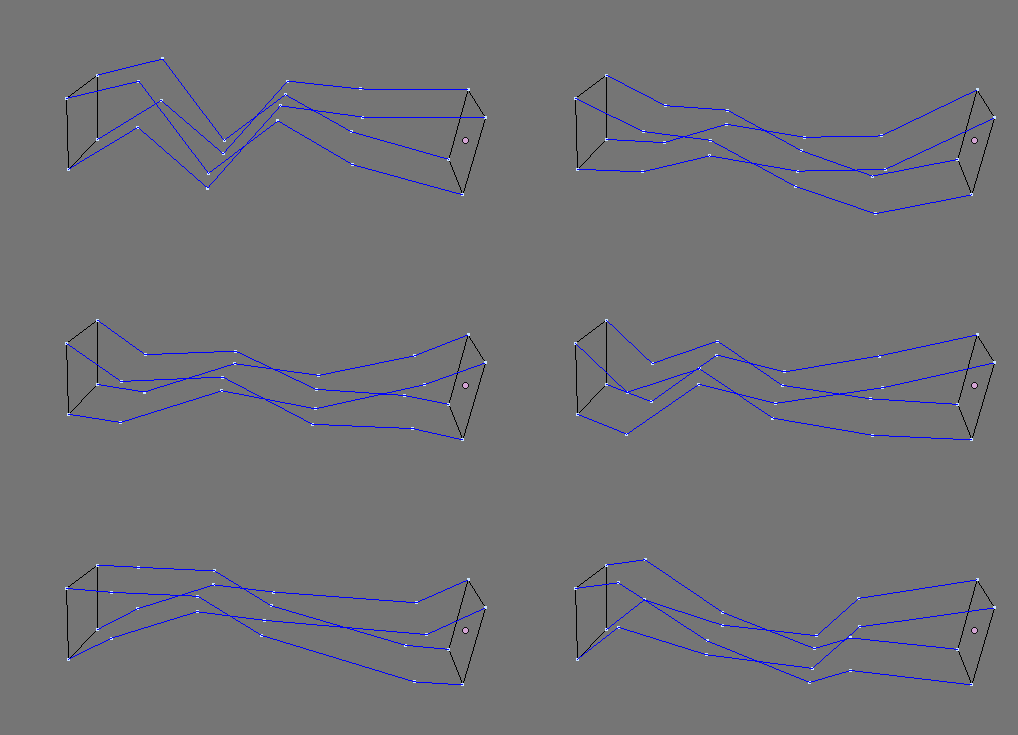
With that VECTOR PATTERN IN MIND, for our Random Vector, instead of generating all very long Random Vector DATA, we want to create it like pieces of string.

And we like to make it so that for each line, it will be the same (at first):
=0= (8)
(0,0,0)
random vectors
random vectors
random vectors
random vectors
random vectors
random vectors
(0,0,0)

BIG MAP BREAK POINT


Ok, so we have now Connected Threads that is the same. This is actually more manageable and also expandable.

If we want a MORE RANDOM THREAD, perhaps, we can use the VECTORIZED INPUT, aka the LIST INPUT node.

However, I realized that if I plug in the VECTORIZED INPUT into the Random Vector, we kind of lose the pattern.

INSTEAD OF:
0, random, random, random, 0, 0, random, random, random, 0, 0, random, random, random, 0....

WE ARE GETTING
0, random1, random1, random1, random2, random2, random2, random3, random3, random3, 0, ...

WHAT I THINK WE NEED:
0, rand1, rand1, rand1, 0, 0, rand2, rand2, rand2, 0, 0, rand3, rand3, rand3, 0,0, ....

This is certainly leading to another interesting problem!

<<< I AM STUCK HERE >>>

HOW ABOUT A DIFFERENT SOLUTION?

Well, actually few days ago before writing this, I was doing similar thing to create Multiple Thread Strands between 2 meshes.

As below you see that I am using the CENTER POLYGON vectors and I push them a little bit out so that I can see the NORMAL from each FACE.

I think below is quite nice as well.

The issue will be the SKIPPING of FIRST and LAST Edges, the lines itself is not very connected to the original POINTS.

However, below everything is working nicely, parametrically. 


I could increase the Mesh Count and still getting predictable result. The Lighting Strands are also animatable and I have full control over the number of strand points in between.

It does look a bit like THE FORCE LIGHTNING

Strand Lightning Effect.


The next "problem" is to make this work if the 2 x MESH does not have the same number of points. We could probably use something like LIST MATCH.

KDTREE NODES FOR STRANDS

Using Kdtree nodes are also something that is interesting to try on. I think this is some kind of Algorithm used by Spiderman or spiders in general.


ANOTHER SOLUTION? Update 2014.05.17


Mr Ko at Blender Artist posted something about replacing Edge with "Interpolated Edge", using Adaptive Edges. And suddenly I realized that we can use that Adaptive Edges node for our setup.

I came up with this Sverchok Node Tree that is I think quite elegant.

The idea is still similar. I would love to go through the above step by step, however, that would take too long, I will give you the BLEND for your own study below:

BLEND:

Basically what is happening is like this:
1. We have 2 objects Mesh coming in. We need to care about how many faces both Mesh have. For now, let's assume that we keep both Face Count the same.
2. Like before, I like to have more control over BEGINNING and ENDING POINTS.
3. I use the Face Normal and the position of points emiting from the Face Normal and connect it as Edges.
4. Edges can be replaced with "Interpolated Edges" using Adaptive Edges node. I like this method a lot. Thanks Ko for mentioning.
5. Next, we could easily randomize the Interpolated Edges Vector with NOISE or VECTOR RANDOM.
5. Finally, it is just a matter of using Math to find the BEGINNING and ENDING POINTS. 
6. Connect all the edges needed and we have this final result.

I also figure out that:
LIST MASK x % n[0] == (n[0] - 1) is the opposite of LIST MASK x % n[0] > 0

In Procedural Workflow, there is NO SINGLE ANSWER for A PROBLEM. There are many. Some are more efficient, more complex, some are simpler, we call it "hack way" but it does the job, maybe not too perfect, but it works for now.

Now, the setup above is just a bit slow, it is running around 1 FPS at some point, maybe there was some complex calculations. Hopefully Sverchok speed will improve overtime.


NOTE: Performance test is showing that the culprit of slowness is how I use Formula2 node. Maybe the comparison to get True False list is too slow to calculate now. Will post a different alternative that is faster when I found one.

This seems to be fresh from the oven, still work in progress from the Blender Development Side, but if you like Blender Cycles and want to render some Hair Strands, then this is something cool you want to experiment with!

Light Emitting Hair Strand, it feels like dejavu all over again. This time it is in Cycles.

THE THREAD
I am actually just collecting some useful information from Blender Artist forum thread post on Blender Hair:
http://blenderartists.org/forum/showthread.php?274660-Cycles-Strand-Rendering

From that long thread, try and find a link to Blender Build with "Enable Cycles Strands" Option under the ParticleSystem as below:


NOTE:
If you cannot find the Cycles Strand Rendering option, try switching Feature Set to Experimental:

Also double check that you are in Cycles Rendering Mode.


Once you have the Blender Build with this feature and set everything, create some Particle Hair and render it in Cycles.

You don't really need to mess with Node Editor, the Hair Strand will render whatever Hair Particle you have and by default the Hair Material color is piped from the Object Material.

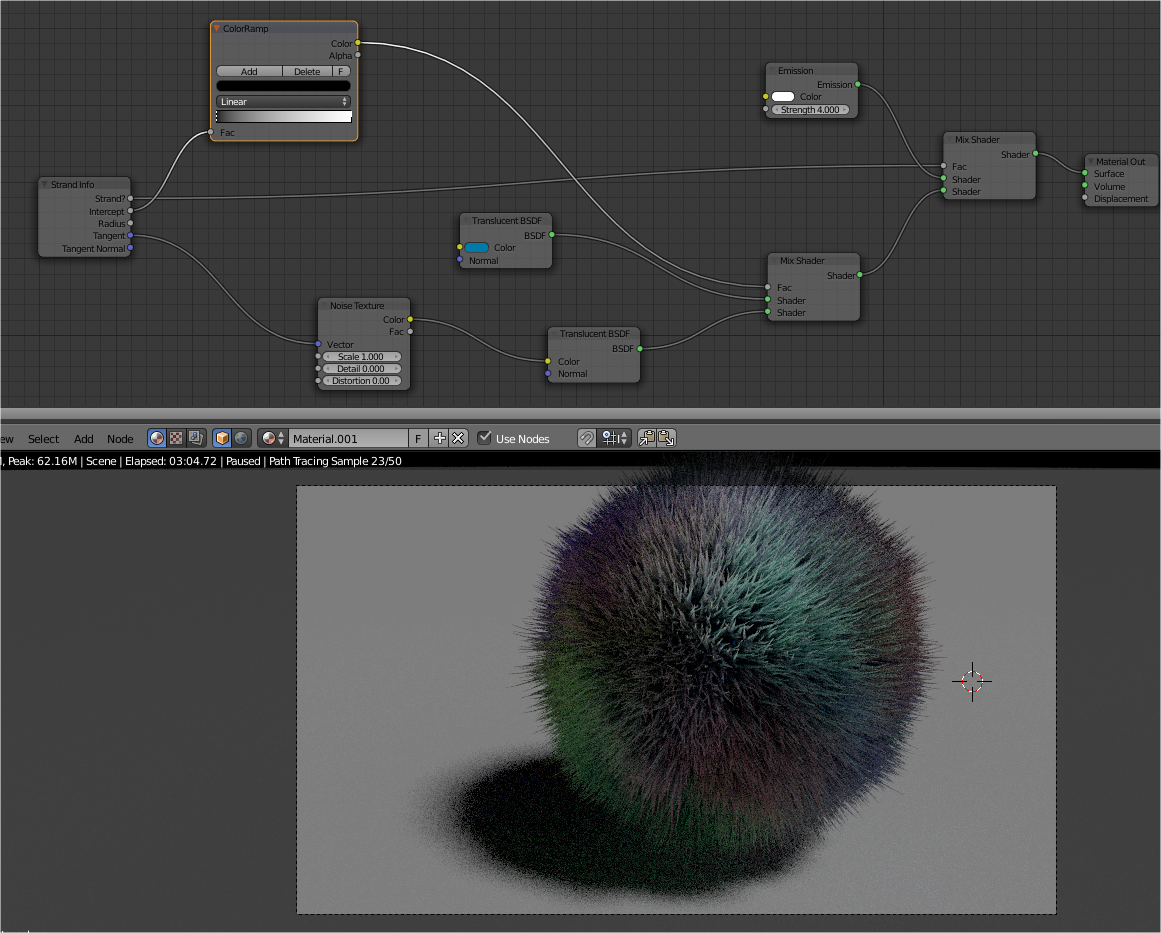
Only when you start to really develop the look of the hair, you may need to pipe in Strand Info node in the material.

Keep in mind that this is "brute force" method (instancing triangle mesh that goes the length of the strands), probably not yet fully optimized, but it is still pretty stable, quite fast preview especially when you render it in real time on 3D View. You can get nice frame render like 15 minutes per frame for full noise-free render. It depends on complexity really.

What really interesting is the additional Strand Info node that allows you to easily pass on data from Strand and really tweak the look of each strand.

STRAND INFO: Is Strand?

Looks like this is one way you can separate Material Color/Shader for the Emitter and the Strand. I am not 100% sure, but looks like this is one way to do it.


STRAND INFO: Intercept
Use Strand Info Intercept output with ColorRamp to ramp beginning and end Color along the length of strand.


The Intercept is also useful is you like to make the end of strand transparent to give softer look.

MIX SHADER COMBO
There are certainly unlimited way you can try and mix shaders for Strands. All the possibilities, including the OSL shader you can apply to it.
Colorful Furball.
UV Image Texture
This works right away, all you need to do is just apply Image Texture and UV like usual. All the color information will just transfer to each hair strands.

Big number Width Multiplier (grass like)
Small number Width Multiplier


ONE MORE THING ...
Dynamic Paint and Blender Particles Hair. There is still a gap between these two. Dynamic Paint goes really far already, while Blender Particles (with Node Editor and node workflow) is catching up. Can't wait until these two really connect, talk and fully blend with one another.

MKRdezign

Contact Form

Name

Email *

Message *

Powered by Blogger.
Javascript DisablePlease Enable Javascript To See All Widget