


BGE / Loops and Other Stuff 1
Unknown
2:50 AM
bge
,
blender3d
,
color
,
demoscene
,
game
,
loop
,
looping
,
material
,
mosquito
,
scratch
,
screensaver
,
stencyl
,
unity3d
I have a feeling that Blender Game Engine (BGE) is very under-utilized by many of Blender Artists. BGE can certainly do a lot that is not necessarily for game creation, but potentially useful and powerful.
I had looked at BGE some times ago while reading one of the available book on BGE and now decided to look further details.
In the past, I casually made these using BGE:
- Interactive 3D Portfolio
- 360 viewer
Hopefully, we can together come up with simple ideas that can be useful for general usages.
The great thing about game or interactive applications is its immediacy. Unlike Film production where we need to worry about render time where the result is final, in Game production, we will end up with products and applications that is interactive and continuously being changed and rendered in real time. The users have control over the final product.
I mean, this is obvious, right? But very powerful if you think about it.
If we can connect the interactivity and real-time nature, we can create automation which relates to robotic. Customization is also possible.
The teacher at Powerhouse Museum, James, said their method is to teach game hollistically. Meaning like going through whole production, not getting too much details with things, but giving enough general (yet complete) understanding of game production and design concepts, so that learners can then continue on their own.
I found that Unity 3D is a very "scripted" game authoring tool. You need to know or understand programming or coding if you want to go far. However, Unity is also very good and organized. I love the Unity interface and workflow.
Unity works well with Blender.
There is this great book on Unity by Penny de Byl:
http://holistic3d.com
These kind of tools are great for starting.
I am hoping that slowly, I can collect some informations about BGE and Python game programming and reshare it with you as I understand it.
These areas are what I interest the most
But read through, it will make sense very soon :]
We are going to create a super simple Colorful Motion Graphics "Mosquito Repellant" using BGE. How can that possible? Let me explain.
Do you often have Mosquito problem at home? Everyone must have experienced how annoying it is to have mosquito flying around before sleeping. You can turn on Air Conditioner, mosquitos are usually afraid of cold temperature. But for me, I don't like using A/C to repell them.
I figure out a strange theory that mosquitos are either attracted or totally distracted by a bright colorful light that keeps on changing. So, if you actually have a "computer screensaver" that keeps on changing color, mosquito will stop disturbing you (hopefully). Work best in a dark bedroom.
NOTE:
If you have iPad or iPhone, I recommend this app called "Flashlight" that allows you to create a changing color. Other smartphones probably can find similar apps.
ANYWAY, for the rest of people without iPad or iPhone, do not be afraid or feel disappointed, we have a computer (with monitor) and Blender, and definitely we can create that "Flashlight" program. Very easily and no programming or coding!
We just need to use this ability in BGE:
Changing Color (RGB) value and Alpha transparency of an Object in Blender and make it Looping.
When I am researching for "how to change Material color" in BGE, I found too many answers. Some answers are too old (older version of Blender) and some are not straight forward. However, luckily, there are few exceptional people that explain and answer the right problem, the right way.
Blender always needs more Blender evangelists and teachers who are developers and artists. Thanks to forum like Blender Artists and many blogs out there, everyone can continue advancing their Blender skills.
This one video tutorial helps me a lot.
http://www.youtube.com/watch?v=jodWo9ryb4E
Another one also really good demo showing the capability.:
http://www.blenderartist.org/forum/showthread.php?299708-Changing-opacity-of-objects
http://www.youtube.com/watch?v=N2jbxH3BTyQ
More useful links that is related to the topic:
http://blenderartists.org/forum/showthread.php?126051-BGE-materials-textures
http://blenderartists.org/forum/showthread.php?325609-How-set-object-s-material-and-texture-in-game-using-python-script-BGE-python
http://blenderartists.org/forum/showthread.php?202264-Changing-material-in-bge
So, apparently there are many ways you can setup "Object with changing color" using BGE:
Once you have the Material setup for object and simple animation of changing color, you then just need to LOOP the animation of changing color and then run the BGE creation as a Standalone application.
Enough talk, let's make it.
1. Startup BGE scene
What we are going to create is very, very simple. We just need an object that continuously changes color overtime. Since the final will be a BGE application, it will run in realtime.
ENVIRONMENT: Set Blender to "Blender Game" environment. You should find this option at the top bar.
CAMERA: Reset the default camera, zero the Position and Rotation in the properties and then slightly bring it up.
The final Game/Application should make use of this camera view.
For our application, we really only need a flat basic Plane Mesh with Material that changes color.
Just for reference (on how camera is facing the senece, I added Suzanne the Monkey object, I smooth her and add some divisions. The setup is like below. We can have 3D view on the left and another 3D view on the right layout.
Remember hitting P will activate the Game Engine and hitting ESC will escape that running BGE.

We can test our BGE application using Standalone Player. Which should result like below. You see how in Standalone app we are getting a view from camera. This is what we want.

We get just black looking render, because we have not applied shader yet. We will do that next.
You can set Standalone playback test to be Full Screen.
2. Apply GLSL Materials
Change BGE environment setup to use "GLSL" for rendering. --- CORRECTION: Use "MultiTexture" if you want below to work.
Add some Materials to the object. For my scene, I give Blue Material for the flat Plane and Red Material for the Monkey.
Test the game.

That is the default basic materials. Notice how the default light is shading the scene and the Materials look quite nice.
Look at this old BGE tutorial, I like the simpliticy of this tutorial and look at the result, it is so good looking even back then. Today, with GLSL render, we can get a lot better looking result:
http://otothecleaner.free.fr/tutorials/LevelDesign2/level4/level2-4.html
3. Get rid of jaggies/aliasing.
You may notice the jagginess of Suzanne. We do not really need Suzanne but anyway, increase the AA (anti-aliasing) Samples to higher than zero and now you have a nice smooth blending between Suzanne and the background.
I actually like BGE real-time renderers look. With proper texturing, nice GLSL shader, you can have a very nice 3D visualization. Definitely something to explore at later stage.
4. Make flat Material (WARNING: Blender Bug) --- Read below, but SKIP FOR LATER
For our purpose, we do not really need a light shading, we actually just make the Material = Shadeless.
HOWEVER, if you at this stage make the Material = Shadeless, there is a bug in BGE that will completely make the next step is not working.
So, I think it is best to make the Material shader flat later. Please skip this step for later.
I recommend you to create Color Animation first, then make Shadeless.
NOTE: Unfortunately BUG like this happens. It took me a while to figure it out. I need to report this to Blender Foundation.
I could be wrong about the bug, but I am using Mac, and I tested many times, if I change Material to Shadeless, I use the ability to animate material color overtime.
If you want GLSL mode to work, you need to use Object Color. You can animate Alpha (transparency) of object this way.
5. Changing Material Color
To change material color overtime, we simply animate the Color RGB. Set keyframes on Material Color, and change the color for 100-150 frames. The animation range is up to you actually.
6. Loop the animation in BGE.
This step is the most important for Blender Game Engine. We will LOOP the animation using Action actuator.
SENSORS: Always (enable that button greyed below)
CONTROLLERS: And
ACTUATORS: Action (use Ping Pong, set the Start and End Frame).
Ensure you select the right action related and linked to the object.
Connect all three.

You are basically done and if you playback in realtime, you will create an app that will repel the mosquitos. Really.
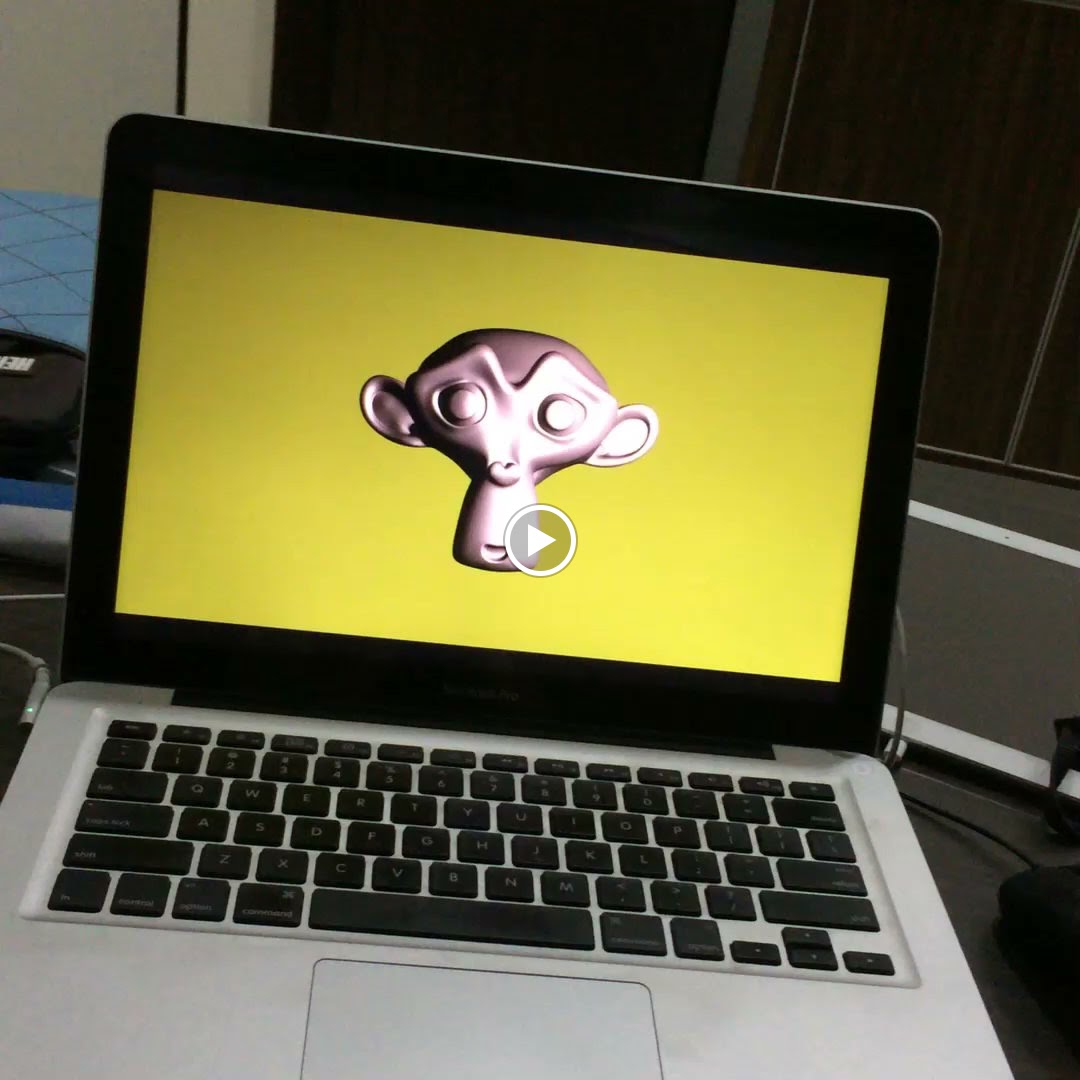
It's very simple, but you just created an applications that will work on any operating systems.
You can export it as a packaged app on Mac or exe on PC. Just enable the export as Stand-Alone Running Game inside the Add-On menu.
OF COURSE:
- You probably should add some basic UI to quit the app, etc. Simple controls/interactivity to rotate the monkey for example.
- Add other beautiful looping things
You may think you do not learn much, but wait for the next post in the series. This simple LOOPS is enough for you to create many useful apps. Even interactive point and click games for kids.
This looping thing is an introduction. You can create multiple scenes and add some button interaction to jump to different scene quite easy in BGE.

This kind of simple apps is something you can make quite easily using BGE. Of course, from simple apps, we can start building a more complex interactive apps, then games.
http://en.wikibooks.org/wiki/GLSL_Programming/Blender/Minimal_Shader
Looking at some examples of GLSL on WebGL like below is quite amazing:
https://www.shadertoy.com
I didn't see "demoscenes" as much, however, I think the artform is still growing.
https://www.youtube.com/watch?v=iRkZcTg1JWU
Now, I am really wondering if Blender Game Engine could be used for DEMOSCENE of some sort. Why not? I think it is there. It's open source, the BGE is great, easy to use. Maybe not 100% DEMOSCENE pure algorithms, however, imagine something that is more interactive, less linear, has some kind of narrative, you got something that is kind of DEMOSCENE. It can be poetic, but most important, it needs to be REALTIME, not rendered. Maybe it also needs funky Machine Made tunes? Tell me what you think in the comments, if you have similar thought. Thanks!
http://www.blendernation.com/2006/12/03/using-blenders-game-engine-for-more-than-just-games/
I had looked at BGE some times ago while reading one of the available book on BGE and now decided to look further details.
In the past, I casually made these using BGE:
- Interactive 3D Portfolio
- 360 viewer
Hopefully, we can together come up with simple ideas that can be useful for general usages.
INTERACTIVE + REAL-TIME
Recently, I found some big interest in interactive applications and real-time Computer Graphics creations. Game productions make use of these "procedural" real-time stuffs. Animation (like dynamic), music/sound, shaders, etc. all working and can be controlled in real time.The great thing about game or interactive applications is its immediacy. Unlike Film production where we need to worry about render time where the result is final, in Game production, we will end up with products and applications that is interactive and continuously being changed and rendered in real time. The users have control over the final product.
I mean, this is obvious, right? But very powerful if you think about it.
If we can connect the interactivity and real-time nature, we can create automation which relates to robotic. Customization is also possible.
UNITY 3D
By some chances, recently I had access to a game design workshop on Unity at Sydney's Powerhouse Museum. It is basic workshop for young brilliant kids (7+), however, I like the approach of going through a complete project from A to Z.The teacher at Powerhouse Museum, James, said their method is to teach game hollistically. Meaning like going through whole production, not getting too much details with things, but giving enough general (yet complete) understanding of game production and design concepts, so that learners can then continue on their own.
I found that Unity 3D is a very "scripted" game authoring tool. You need to know or understand programming or coding if you want to go far. However, Unity is also very good and organized. I love the Unity interface and workflow.
Unity works well with Blender.
There is this great book on Unity by Penny de Byl:
http://holistic3d.com
The book is very balanced in Technical and Artistic contents.
SCRATCH AND STENCYL
If programming and coding feels scary, you can start with Scratch programming. Then you can move to Stencyl, which is like a more advanced version of Scratch, specially made for game programming.These kind of tools are great for starting.
Blender BGE & its Python programming
BGE is interesting. Unlike other 3D packages, BGE inside Blender is quite solid. It is probably "limited", but it is sufficient for many applications or game creations, and can be expanded.I am hoping that slowly, I can collect some informations about BGE and Python game programming and reshare it with you as I understand it.
These areas are what I interest the most
- Animation and Procedural Animation
- Procedural Shader (GLSL, CG language)
- Some scripting trigger and action, such as creating control and automation
USING BGE AS MOSQUITO REPELLANT
Ok, this one is probably the weirdest subtitle you will ever read, that sounds like totally unrelated to Blender.But read through, it will make sense very soon :]
We are going to create a super simple Colorful Motion Graphics "Mosquito Repellant" using BGE. How can that possible? Let me explain.
Do you often have Mosquito problem at home? Everyone must have experienced how annoying it is to have mosquito flying around before sleeping. You can turn on Air Conditioner, mosquitos are usually afraid of cold temperature. But for me, I don't like using A/C to repell them.
I figure out a strange theory that mosquitos are either attracted or totally distracted by a bright colorful light that keeps on changing. So, if you actually have a "computer screensaver" that keeps on changing color, mosquito will stop disturbing you (hopefully). Work best in a dark bedroom.
NOTE:
If you have iPad or iPhone, I recommend this app called "Flashlight" that allows you to create a changing color. Other smartphones probably can find similar apps.
ANYWAY, for the rest of people without iPad or iPhone, do not be afraid or feel disappointed, we have a computer (with monitor) and Blender, and definitely we can create that "Flashlight" program. Very easily and no programming or coding!
We just need to use this ability in BGE:
Changing Color (RGB) value and Alpha transparency of an Object in Blender and make it Looping.
When I am researching for "how to change Material color" in BGE, I found too many answers. Some answers are too old (older version of Blender) and some are not straight forward. However, luckily, there are few exceptional people that explain and answer the right problem, the right way.
Blender always needs more Blender evangelists and teachers who are developers and artists. Thanks to forum like Blender Artists and many blogs out there, everyone can continue advancing their Blender skills.
This one video tutorial helps me a lot.
http://www.youtube.com/watch?v=jodWo9ryb4E
Another one also really good demo showing the capability.:
http://www.blenderartist.org/forum/showthread.php?299708-Changing-opacity-of-objects
http://www.youtube.com/watch?v=N2jbxH3BTyQ
More useful links that is related to the topic:
http://blenderartists.org/forum/showthread.php?126051-BGE-materials-textures
http://blenderartists.org/forum/showthread.php?325609-How-set-object-s-material-and-texture-in-game-using-python-script-BGE-python
http://blenderartists.org/forum/showthread.php?202264-Changing-material-in-bge
- Use Python scripting way to change color in realtime, this is more sophisticated and can make a more interesting application.
- Use Blender Actions (Animation). Luckily, thgis method is actually quite simple. It can be made by anyone, even someone who use Blender for the first time.
Once you have the Material setup for object and simple animation of changing color, you then just need to LOOP the animation of changing color and then run the BGE creation as a Standalone application.
Enough talk, let's make it.
1. Startup BGE scene
What we are going to create is very, very simple. We just need an object that continuously changes color overtime. Since the final will be a BGE application, it will run in realtime.
ENVIRONMENT: Set Blender to "Blender Game" environment. You should find this option at the top bar.
CAMERA: Reset the default camera, zero the Position and Rotation in the properties and then slightly bring it up.
The final Game/Application should make use of this camera view.
For our application, we really only need a flat basic Plane Mesh with Material that changes color.
Just for reference (on how camera is facing the senece, I added Suzanne the Monkey object, I smooth her and add some divisions. The setup is like below. We can have 3D view on the left and another 3D view on the right layout.
Remember hitting P will activate the Game Engine and hitting ESC will escape that running BGE.
We can test our BGE application using Standalone Player. Which should result like below. You see how in Standalone app we are getting a view from camera. This is what we want.
We get just black looking render, because we have not applied shader yet. We will do that next.
You can set Standalone playback test to be Full Screen.
2. Apply GLSL Materials
Change BGE environment setup to use "GLSL" for rendering. --- CORRECTION: Use "MultiTexture" if you want below to work.
Add some Materials to the object. For my scene, I give Blue Material for the flat Plane and Red Material for the Monkey.
Test the game.
That is the default basic materials. Notice how the default light is shading the scene and the Materials look quite nice.
Look at this old BGE tutorial, I like the simpliticy of this tutorial and look at the result, it is so good looking even back then. Today, with GLSL render, we can get a lot better looking result:
http://otothecleaner.free.fr/tutorials/LevelDesign2/level4/level2-4.html
You may notice the jagginess of Suzanne. We do not really need Suzanne but anyway, increase the AA (anti-aliasing) Samples to higher than zero and now you have a nice smooth blending between Suzanne and the background.
 |
| No jagginess on the edge of the monkey. |
4. Make flat Material (WARNING: Blender Bug) --- Read below, but SKIP FOR LATER
For our purpose, we do not really need a light shading, we actually just make the Material = Shadeless.
HOWEVER, if you at this stage make the Material = Shadeless, there is a bug in BGE that will completely make the next step is not working.
So, I think it is best to make the Material shader flat later. Please skip this step for later.
I recommend you to create Color Animation first, then make Shadeless.
NOTE: Unfortunately BUG like this happens. It took me a while to figure it out. I need to report this to Blender Foundation.
I could be wrong about the bug, but I am using Mac, and I tested many times, if I change Material to Shadeless, I use the ability to animate material color overtime.
CORRECTION:
The reason animation didn't work is because I use "GLSL" mode for BGE. Use "Multi Texture" for BGE instead.If you want GLSL mode to work, you need to use Object Color. You can animate Alpha (transparency) of object this way.
 |
| If you make Shadeless before animating, you will not get the animation as expected. Weird and very annoying bug. |
5. Changing Material Color
To change material color overtime, we simply animate the Color RGB. Set keyframes on Material Color, and change the color for 100-150 frames. The animation range is up to you actually.
6. Loop the animation in BGE.
This step is the most important for Blender Game Engine. We will LOOP the animation using Action actuator.
SENSORS: Always (enable that button greyed below)
CONTROLLERS: And
ACTUATORS: Action (use Ping Pong, set the Start and End Frame).
Ensure you select the right action related and linked to the object.
Connect all three.
You are basically done and if you playback in realtime, you will create an app that will repel the mosquitos. Really.
It's very simple, but you just created an applications that will work on any operating systems.
You can export it as a packaged app on Mac or exe on PC. Just enable the export as Stand-Alone Running Game inside the Add-On menu.
OF COURSE:
- You probably should add some basic UI to quit the app, etc. Simple controls/interactivity to rotate the monkey for example.
- Add other beautiful looping things
You may think you do not learn much, but wait for the next post in the series. This simple LOOPS is enough for you to create many useful apps. Even interactive point and click games for kids.
This looping thing is an introduction. You can create multiple scenes and add some button interaction to jump to different scene quite easy in BGE.
- INTRO SCENE
- LEVEL SCENE
- CREDIT SCENE
BGE Color Changing, the Python Way
Below is a quicky example:
EXAMPLE CODE:
import bge
import random
cont = bge.logic.getCurrentController()
own = cont.owner
# print(random.random())
myR = random.random()
myG = random.random()
myB = random.random()
myAlpha = 1.0
newColor = [myR, myG, myB, myAlpha]
own.color = newColor
So with above Python script, we can randomly update and change the "Object Color". Apparently it is rather simple to modify the "color" attribute of Game Object like above.
Related Links:
Below is a really good YouTube channel to learn about BGE and Python scripting:
I will talk more about this in the next post. Don't rush in into Python Game scripting if you are not familiar with Python scripting.
What better is to understand the BGE workflow first. Knowing what can be achieved without script (with node alone) and with script.
In few weeks to come, I will borrow Mike Pan's book on Blender Game Engine (BGE) from the library, by then hopefully I can understand BGE better.
REGARDING THE GLSL PREVIEW BUG...
GLSL should be the mode where our game just works and displaying properly, but as you may notice, in 3D view, if we tap the P, the GLSL mode does not work properly. But it works on Stand Alone Player!
I am asking this GLSL issue at the forum here:
There is somewhat this "inconsistency" of Multi Texture mode, GLSL mode in BGE that sometimes bug me. Such as having to enable "Object Color" in order for GLSL to obey the Action animation of Color. I believe Multi Texture is the older mode for BGE.
Hopefully we get the answer soon.
By default, it is set to Solid Mode. For users switching to GLSL on BGE, when they press P and getting something flat like below:

All you need to do is change Viewport Shading from Solid to Texture.

And you should be getting a more expected BGE realtime playback below:

UPDATE 2014.02.18:
I figure out myself why I am getting a weird result when using GLSL. Viewport Shading: Texture Mode and Solid Mode. It needs to be in Texture Mode!By default, it is set to Solid Mode. For users switching to GLSL on BGE, when they press P and getting something flat like below:
All you need to do is change Viewport Shading from Solid to Texture.
And you should be getting a more expected BGE realtime playback below:
It was a bit dumb, but anyway, at least if you encountered this, you know how to fix it. I really think it should not be the default result, or at least there is a notification or something.
Now, the GLSL mode will require you to use Actions from "Object Color" if you ever want to animate the Color RGBA (RGB and Alpha transparency). Material Diffuse will not work. I have to double check this again, but I think that's correct.
FURTHER ON...
Think of different ideas that uses ANIMATION and LOOPING for BGE, you can create SCREENSAVER application this way!This kind of simple apps is something you can make quite easily using BGE. Of course, from simple apps, we can start building a more complex interactive apps, then games.
GLSL inside BGE
I feel challenged to get into GLSL Programming. I know this is probably more complicated than the OSL, but worth looking into.http://en.wikibooks.org/wiki/GLSL_Programming/Blender/Minimal_Shader
Looking at some examples of GLSL on WebGL like below is quite amazing:
https://www.shadertoy.com
ONE MORE THING... DEMOSCENE
I don't have much knowledge or experience about things called "demoscene", however, I have seen some DEMOSCENES back then when Internet was still slow. There are some really memorable demoscene, which was tiny in file size, however, it was captivating.I didn't see "demoscenes" as much, however, I think the artform is still growing.
https://www.youtube.com/watch?v=iRkZcTg1JWU
Now, I am really wondering if Blender Game Engine could be used for DEMOSCENE of some sort. Why not? I think it is there. It's open source, the BGE is great, easy to use. Maybe not 100% DEMOSCENE pure algorithms, however, imagine something that is more interactive, less linear, has some kind of narrative, you got something that is kind of DEMOSCENE. It can be poetic, but most important, it needs to be REALTIME, not rendered. Maybe it also needs funky Machine Made tunes? Tell me what you think in the comments, if you have similar thought. Thanks!
UPDATE 20140216
Researching around the idea of using BGE more than just for game creation, I stumbled into this old post from Blender Nation. Mike's Pan examples. Will check if these examples still work, maybe can learn few tricks.http://www.blendernation.com/2006/12/03/using-blenders-game-engine-for-more-than-just-games/