
SVERCHOK / Basic of Semi Procedural Animation
Unknown
8:11 PM
animation
,
blender3d
,
complexity
,
domino
,
domino effect
,
interpolation
,
jiggle
,
map range
,
normal
,
procedural
,
puppet
,
qumarion
,
robot
,
tangent
,
virtual
It is still pretty early to talk about animation inside Sverchok, however I decided to do this early on because PROCEDURAL ANIMATION is interesting area to explore and to understand.
This is something that is potentially become a lot easier to do (hopefully!).
NOTE:
Keep in mind that Node-Tree animation in Blender itself has limitation, like: animation cannot actually be viewed in Graph Editor as f-curve. Keep this in mind. The keyframes itself is viewable inside Dope Sheet and the timing can be tweaked. However the spacing or how fast or slow the animation is, cannot be adjusted, meaning the time animation is linear.
In animation, we have ORIGIN and DESTINATION of value. What we see is a smooth moving picture what we know as animation. We need around 15 FPS (frame per second) at least for it to start becoming smooth. 24-30 FPS is common for film. 60 FPS for current next generation game animation.
The animation interpolation can be LINEAR (straight line) or other type of animation curves to give the illusion of weight or a change in speed, ease in, ease out, a more naturalistic motion.
The VALUE over TIME animation concept can be applied to:
DRIVER and EXPRESSION is something that is closer to Procedural Animation concept. And that is exactly what we will do inside Sverchok.
There will be some "limitation" to our ability to do animation inside Sverchok. But I think anything is possible with a bit of creativity. We just have to do it in the most raw and low level kind of thinking at the moment. Which could be interesting because we are setting up what under the hood.
Not the simplest, but still pretty elegant when things are setup carefully.
Normally when dealing with animation that is closer to the raw nature of computer graphics, the result tends to be more ABSTRACT, and this ART is often called MOTION GRAPHICS. The distinction is often made between CHARACTER ANIMATION and these type of animation.
Probably the abstraction just happens, because of these elements:
https://vimeo.com/channels/mainframemash/
https://vimeo.com/67639794
That's a neat paid plugin from the demo. I have not used it, maybe I should give it a try.
UPDATE:
I downloaded MASH plugin for Maya, and played a bit with it. From what I understand, this is basically a clever framework for Maya's Particle System and Instancing.
Normally it would be quite complicated to setup all this. MASH actually make it quite easy to create some interesting motion graphics animations with repetition of objects:
- Distribute and Arrangement of Many Objects in Grid
- Animate Particle Instances along Curve
- Randomize Particle Instances via ID, etc
- Adding Random and Noise to the Movement of Particle Instances
- Controlling Particles in Trigonometry Motion (Sine, etc)
- Controllable Influence Objects
- Offset and Delay in Motion
- Control over Visibility
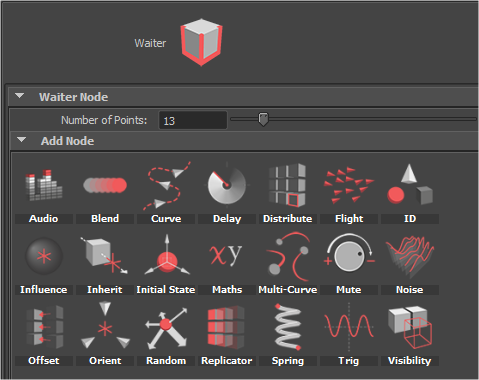
Overall, pretty impressive set of Nodes in Maya to make working with Particles and Instancing for Motion Graphics animation a lot more elegant.
However, even with MASH, there is not so much smooth workflow on the Maya Node Graph itself. MASH manages to connect all these advance Node with lots of attributes to have control over the array of Particles and Instancing, great for artists, however in the long term, this kind of framework is difficult to be expanded by artists.
One thing about current state of Node Editing and Graphing in Maya == it is a mess and a nightmare, basically. The node graph architecture seriously needs to change there. Houdini 3D node graph is a lot cleaner and much simpler to use.
I supposed, looking at this in regards to current state of Blender Particles and Sverchok, and thinking what could be potentially happening in the future, or what not, we are definitely in the good track.
One day we will be able to do all these more easily and more elegantly inside Blender! Let's hope so.
I heard that Cinema4D is probably still the king of motion graphics in 3D. I can agree with that, even though I don't use much of Cinema4D myself. Many Graphic Designers and Motion Graphics artist are using it and Cinema 4D Mograph has some unique quality about it.
Side Effects Houdini 3D can also do animation and some weird complex abstract animation, because the fact that in Houdini, animation is viewed as CHANNELS and CURVES. Every Points (or Vertices) in Houdini can be seen as Curves, which is really unusual.
If you want to do pure procedural animation, Houdini is a great one to get on. However, it can be very complex easily and you need more brain capacity to setup animation like that.
How about Blender and Sverchok? Well Blender can always blend it. I think SEMI-PROCEDURAL is what I would call it.
NOTE:
Always remember that Sverchok is a result of time and energy of its developers. Just like Blender, the development relies on hard work of developers, I think donation can help.
REAL => VIRTUAL
Take a look at this "QUMARION" robot puppet for CG Animators:
http://www.clip-studio.com/quma/en/
The Qumarion robot puppet allows animators to pose the robot puppet and having its pose information data translated back to the virtual figure inside computer.
The idea is not far different from Motion Capture, recording motion data from human or other creature or device and applying it into virtual character or objcets.
VIRTUAL => REAL
In Robotic technology, we control the robot using a simulation or a program.
VIRTUAL <=> REAL
What would be cool (a dream of many geeks) is to have interaction both ways.
Okey, you understand all above, what is this have anything to do with Sverchok and Blender?
BLENDER DATA <=> SVERCHOK DATA
Remember how I wrote that when we are inside Sverchok, we are working with "ghost mesh" and they are not real (just preview) and they are unlike the Objects in 3D View yet, until we bake them out for Blender to render? Now, I feel that procedurally animating inside Sverchok will be a little bit like that.
I also mentioned that generating and modying mesh inside Sverchok is like working in Edit Mode of Blender. We are not really modifying the original mesh, but we are creating a duplicate of original mesh and we can do anything with it. The result baked mesh is a new object.
There is also this talk by Bret Victor about "Drawing Dynamic Visualizations":
https://vimeo.com/66085662
In that talk, Bret is discussing the idea of being able to manipulate DATA and VISUALIZATION BOTH WAYS. That is clearly a neat idea. And when working with 3D objects have been doing that to the certain extent without knowing it.
I need to make sure that concept is clear first before you continue on.
VERTEX ANIMATION and TRANSFORMATIONAL ANIMATION
So, if we are modifying mesh in Sverchok, or even animating ( when dealing with time and interpolated values) inside Sverchok, we are really animating the mesh components (VERTEX ANIMATION)
Now, what if we just want to animate the TRANSFORM (location, rotation, scale)? That is actually when we are modifying the MATRIX.
When we are actually animating the VERTEX or the MATRIX in Sverchok, we are really not modifying the real object in 3D view, yet. Not until we bake the animation data or pipe the animation back into object.
I will try to explore the possibility to make it as simple as I can. So that in the end, it is as if we are animating using DRIVERS or EXPRESSION. I hope that the Sverchok developers can help to provide the nodes that does this in elegant way.
The GRAND IDEA here is to be able to PIPE IN and OUT the ANIMATION DATA, from and to or perhaps both ways between Sverchok and normal Blender 3D environment that we know.
In Sverchok, we often see, generate, manipulate the DATA as raw as we like to: NUMBERS. And that is what we can do. Generally though, the end users, just care more about the CONTROL and the RESULTING ANIMATION. Being able to interactively see the changes and then bake out the animation just like it was shown in the preview.
---- EVERY NODE COLORED YELLOW BELOW IS KEYABLE ----


"Math for Game Developers" by Jorge Rodriguez
https://www.youtube.com/watch?v=sKCF8A3XGxQ
Now, we should understand about Point and 2D Vector.
In 3D though, we often care more about Vertices (that vertex in 3D space) and 3D Vector. And in Sverchok, you would deal with these guys often, but using node.
So, if we like to "move" the position of every points of a mesh, we can simply use Vectors Move node. By doing so, we really animate the Vertex in 3D space.
In the example node tree below, I am using the Frame Info node, output the current Frame in the Playback and use the value to move Suzanne in X axis.
The animation will be created when there is a value changing slowly (that our eyes can see). At this moment, I will only show you a LINEAR speed of animation. We have not talk about Slow In and Slow Out yet.

Remember that when working in Sverchok, we really is working on the ghost of the mesh, until we bake out the result, whether as many meshes or simply bake the Point Cloud Cache using Point Cache Export and the reload it back into Blender using Mesh Cache.
That is few example of Vertex Animation. It is really not much different to animating using Armature Bones or when we are doing blendshapes using Shapekeys or when we are simulating cloth or softbody dynamic.

The basic concept to change the Transformation value is like above. What we want to transform and interpolate the matrix value over time so that we can have animation.
Let's look at an example using Empty.

Matrix Interpolation is one node we can use to linearly interpolate between 2 Matrix data.

You may notice that we can GO OVER, or OVERSHOOT the value beyond the intended SOURCE and DESTINATION. We can LIMIT that by using MAP RANGE node. We actually need that CLAMP option of Map Range, allowing us to Limit the value MIN and MAX for animation.


This is actually another reason of Procedural workflow. We want to be able to control a large amount of data, with as little effort as possible.
For ARRAY of transformation, what came up to your head right away? PARTICLES! Particle is indeed the common ways we like to deal with large amount of data. To be really good with procedural animator, we want to be God of Particles, I mean, really understand Particles.
With Particles, we commonly want and able to have control all below:
Well, like I said at the first paragraph above, we are quite early in term of dealing with animation using Sverchok. But, then again, ANIMATION is what interest me personally and with some creative and clever setup, you can do it.
Sverchok would really needs:
- Special Instancing Node (!)
- Particle Nodes (!)
Regardless the limitation, let see what we can already do.


What would be nice is that for every different variation of STATE created by RANDOM SEED, we can interpolate the value for each.
Let's keep it simpler for now. Just a linear one and all moving at the same time.


This will give a lot more natural feel when animating many objects. Natural animation should never start and stop at the same time.
The idea is to randomize the QUEUE of animation within a single time line.


If I get rid of VARIATION in ORIGIN and DESTINATION, it is probably more clear:
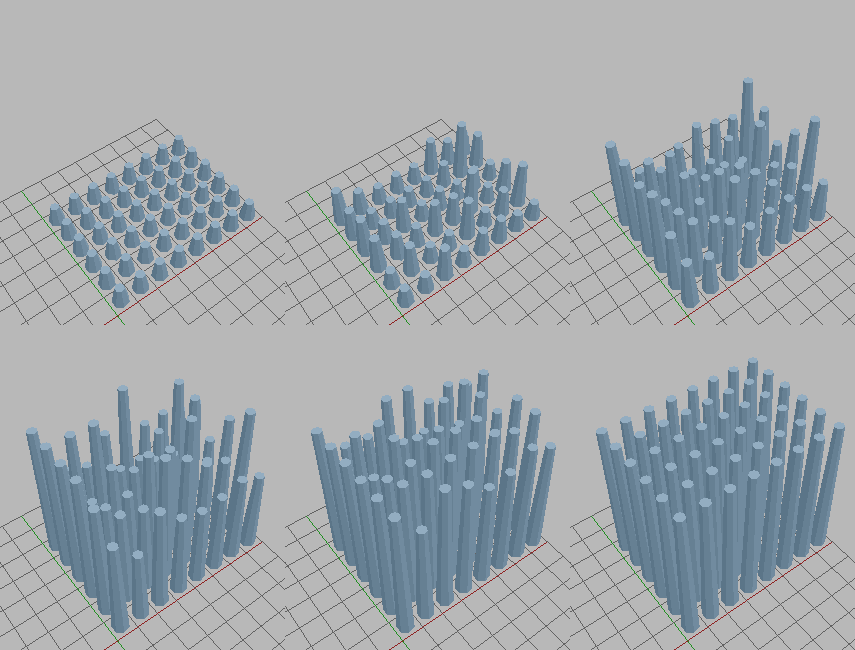
You can use this simple concept to setup DOMINO EFFECTS using Sverchok.
There will be no dynamic with Procedural Animation setup like this. Everything will be driven by values.
1. We draw how we like the Domino to be arranged in the 3D Grid Floor.
Keep it simple, just draw flat Curve using Grease Pencil. Convert GP into Curve.

2. Inside Sverchok, we can Resample the Curve and we already know how to.


3. Clone your "Domino" object. We use Box for now.
If you just clone the domino, you will notice something is not right. The domino is not oriented properly.

4. Orient Points Normal Along Path
This is when the fun stuff begin. We need to calculate the POINT NORMAL along the curve path. We can approximate that by doing Vector SUB, basically the [position of Point at the Front - the current position Point]. We use List Shift for this.


I did the setup above, but it is not perfect, there is one last point whose normal is not pointing correctly.
Linus helped me with an example, so the correct setup is like below:


5. Finally, we want to animate the Domino rotation.
How do we rotate each domino? Simple, we just offset the time for each Domino and we set the min and max or the CLAMP LIMIT for ORIGIN and DESTINATION animation.
For each Domino rotation, the angle goes from 0 to 60 degree. We just need to figure out how to offset the animation for each.


What cool about this setup is that we can REUSE it simply by giving a different CURVE INPUT.


Random positions => Interpolation => NEW Random positions (WITH DELAY OFFSET)
All we need is a construct like below and plug this into the Matrix Interpolation Factor. Below, I further create a setup of ORIGIN and DESTINATION + RANDOM POSITION with 2 x EMPTY.


Once we have the Matrix Setup, we simple bring in any objects. Below is the full setup.


Believe it or not, this is actually the basic concept to do things like controllable Crowd (a bit more complex).
Blender Game Engine actually has some interesting behaviour algorithm. Don't forget we have Blender Particles and we can actually use Blender Particles positional data in Sverchok via Blender Particles.
In a way, Sverchok is potentially become:
- Procedural Modifiers
- Procedural Drivers
- More Robust Controllable Instancer
There are many areas that I have not got time to explore yet.
Such as:
ARMATURE and BONE animations. Maybe we could actually create a setup that drives BONE + ACTION MODIFIER, for a single character. Just for simple animation like from sitting down to standing.
Or maybe animation of Centipede Legs, that will be interesting. Any kind of robotic animation maybe.
Unity has this ANIMATOR feature that enables for switching state of animation and blending between animation. I imagine something like this would be nice to have.
I am sure this is actually possible. A way to have an object animated in the scene, and the CLONES inside Sverchoks to follow the animation with some kind of OFFSET and DELAY controls.
Not sure if this is going to be simple and elegant, yet! Coming soon....
https://medium.com/tictail-makers/giving-animations-life-8b20165224c5
This is something that is potentially become a lot easier to do (hopefully!).
NOTE:
Keep in mind that Node-Tree animation in Blender itself has limitation, like: animation cannot actually be viewed in Graph Editor as f-curve. Keep this in mind. The keyframes itself is viewable inside Dope Sheet and the timing can be tweaked. However the spacing or how fast or slow the animation is, cannot be adjusted, meaning the time animation is linear.
TIME => VALUE
Typically when talking about ANIMATION in 3D Computer Graphics, we talk about keyframing attribute / property / parameter in different time, and what happened is indeed a changing or interpolation between 2 different VALUE over TIME.In animation, we have ORIGIN and DESTINATION of value. What we see is a smooth moving picture what we know as animation. We need around 15 FPS (frame per second) at least for it to start becoming smooth. 24-30 FPS is common for film. 60 FPS for current next generation game animation.
The animation interpolation can be LINEAR (straight line) or other type of animation curves to give the illusion of weight or a change in speed, ease in, ease out, a more naturalistic motion.
The VALUE over TIME animation concept can be applied to:
- Any kind of Transformation data (Location, Rotation, Scale)
- Blendshape or Shapekey animation = special Vertex Animation
- Armature Bone animation => another transformational animation
- Other keyable properties including custom property
VALUE => VALUE
There is also another type of computer animation, in which VALUE is changing dependant of other VALUE (of course TIME itself is a value, however we make a distinction in our case). Blender calls it DRIVERS. Sometimes it is also called Expressions.DRIVER and EXPRESSION is something that is closer to Procedural Animation concept. And that is exactly what we will do inside Sverchok.
There will be some "limitation" to our ability to do animation inside Sverchok. But I think anything is possible with a bit of creativity. We just have to do it in the most raw and low level kind of thinking at the moment. Which could be interesting because we are setting up what under the hood.
Not the simplest, but still pretty elegant when things are setup carefully.
Normally when dealing with animation that is closer to the raw nature of computer graphics, the result tends to be more ABSTRACT, and this ART is often called MOTION GRAPHICS. The distinction is often made between CHARACTER ANIMATION and these type of animation.
Probably the abstraction just happens, because of these elements:
- REPETITION
- REPLICATION
- LOOP
- PARTICLES
- DYNAMICS
- SOUND
- COLOR
MASH IN MAYA AND OTHER STUFFS
Maya, the giant 3D software have plugin called "Mash" that does some Motion Graphics trick.https://vimeo.com/channels/mainframemash/
https://vimeo.com/67639794
That's a neat paid plugin from the demo. I have not used it, maybe I should give it a try.
UPDATE:
I downloaded MASH plugin for Maya, and played a bit with it. From what I understand, this is basically a clever framework for Maya's Particle System and Instancing.
Normally it would be quite complicated to setup all this. MASH actually make it quite easy to create some interesting motion graphics animations with repetition of objects:
- Distribute and Arrangement of Many Objects in Grid
- Animate Particle Instances along Curve
- Randomize Particle Instances via ID, etc
- Adding Random and Noise to the Movement of Particle Instances
- Controlling Particles in Trigonometry Motion (Sine, etc)
- Controllable Influence Objects
- Offset and Delay in Motion
- Control over Visibility
Overall, pretty impressive set of Nodes in Maya to make working with Particles and Instancing for Motion Graphics animation a lot more elegant.
However, even with MASH, there is not so much smooth workflow on the Maya Node Graph itself. MASH manages to connect all these advance Node with lots of attributes to have control over the array of Particles and Instancing, great for artists, however in the long term, this kind of framework is difficult to be expanded by artists.
One thing about current state of Node Editing and Graphing in Maya == it is a mess and a nightmare, basically. The node graph architecture seriously needs to change there. Houdini 3D node graph is a lot cleaner and much simpler to use.
 |
| Maya Node Editor is not a place to work. |
I supposed, looking at this in regards to current state of Blender Particles and Sverchok, and thinking what could be potentially happening in the future, or what not, we are definitely in the good track.
One day we will be able to do all these more easily and more elegantly inside Blender! Let's hope so.
I heard that Cinema4D is probably still the king of motion graphics in 3D. I can agree with that, even though I don't use much of Cinema4D myself. Many Graphic Designers and Motion Graphics artist are using it and Cinema 4D Mograph has some unique quality about it.
Side Effects Houdini 3D can also do animation and some weird complex abstract animation, because the fact that in Houdini, animation is viewed as CHANNELS and CURVES. Every Points (or Vertices) in Houdini can be seen as Curves, which is really unusual.
If you want to do pure procedural animation, Houdini is a great one to get on. However, it can be very complex easily and you need more brain capacity to setup animation like that.
How about Blender and Sverchok? Well Blender can always blend it. I think SEMI-PROCEDURAL is what I would call it.
NOTE:
Always remember that Sverchok is a result of time and energy of its developers. Just like Blender, the development relies on hard work of developers, I think donation can help.
VIRTUAL <=> REAL ANIMATION
I will be talking about another concept here, which will relate to animating in Sverchok.REAL => VIRTUAL
Take a look at this "QUMARION" robot puppet for CG Animators:
http://www.clip-studio.com/quma/en/
The Qumarion robot puppet allows animators to pose the robot puppet and having its pose information data translated back to the virtual figure inside computer.
The idea is not far different from Motion Capture, recording motion data from human or other creature or device and applying it into virtual character or objcets.
VIRTUAL => REAL
In Robotic technology, we control the robot using a simulation or a program.
VIRTUAL <=> REAL
What would be cool (a dream of many geeks) is to have interaction both ways.
Okey, you understand all above, what is this have anything to do with Sverchok and Blender?
BLENDER DATA <=> SVERCHOK DATA
Remember how I wrote that when we are inside Sverchok, we are working with "ghost mesh" and they are not real (just preview) and they are unlike the Objects in 3D View yet, until we bake them out for Blender to render? Now, I feel that procedurally animating inside Sverchok will be a little bit like that.
I also mentioned that generating and modying mesh inside Sverchok is like working in Edit Mode of Blender. We are not really modifying the original mesh, but we are creating a duplicate of original mesh and we can do anything with it. The result baked mesh is a new object.
There is also this talk by Bret Victor about "Drawing Dynamic Visualizations":
https://vimeo.com/66085662
In that talk, Bret is discussing the idea of being able to manipulate DATA and VISUALIZATION BOTH WAYS. That is clearly a neat idea. And when working with 3D objects have been doing that to the certain extent without knowing it.
I need to make sure that concept is clear first before you continue on.
VERTEX ANIMATION and TRANSFORMATIONAL ANIMATION
So, if we are modifying mesh in Sverchok, or even animating ( when dealing with time and interpolated values) inside Sverchok, we are really animating the mesh components (VERTEX ANIMATION)
Now, what if we just want to animate the TRANSFORM (location, rotation, scale)? That is actually when we are modifying the MATRIX.
When we are actually animating the VERTEX or the MATRIX in Sverchok, we are really not modifying the real object in 3D view, yet. Not until we bake the animation data or pipe the animation back into object.
I will try to explore the possibility to make it as simple as I can. So that in the end, it is as if we are animating using DRIVERS or EXPRESSION. I hope that the Sverchok developers can help to provide the nodes that does this in elegant way.
The GRAND IDEA here is to be able to PIPE IN and OUT the ANIMATION DATA, from and to or perhaps both ways between Sverchok and normal Blender 3D environment that we know.
In Sverchok, we often see, generate, manipulate the DATA as raw as we like to: NUMBERS. And that is what we can do. Generally though, the end users, just care more about the CONTROL and the RESULTING ANIMATION. Being able to interactively see the changes and then bake out the animation just like it was shown in the preview.
---- EVERY NODE COLORED YELLOW BELOW IS KEYABLE ----
SIMPLE VERTEX ANIMATION
Vertex Animation is what Sverchok is should be best at! There are plenty of nodes already that allows you to transform the vertices of any mesh object.
Remember that this is very different to actually "transforming" (move, rotate, scale) an object. You are really editing the component of the mesh here. This is just like if you are animating using Shapekeys.
In my previous post, I have kind of touching on how we can CLONE object into an animated line that is deforming like a SINE WAVE. That is also an animation.
BAKING VERTEX ANIMATION => OUT OF BLENDER
Baking out vertex animation is straight forward process. If the Vertex Count (total number of vertices) is the same, this can be done easily using Blender MDD or PC (point cache) export-import add on.
NOTE: If our Vertex Animation in Sverchok is changing the Vertex Count each frame (mesh not just deforming, but also generating or destroying vertices), we need to deal with it differently. Perhaps exporting each baked mesh as OBJ.
For example, the SAPLING GROWING animation below using Subsurf + Build Modifier can be replicated inside Sverchok.
SVERCHOK WAY:
The same effect can be used to "grow" Suzanne mesh:
EDGE:
POLY:
IMPORT VERTEX ANIMATION => INTO BLENDER
Importing back is also very simple, just use the Mesh Cache Modifier.
MORE VERTEX ANIMATION
Watch this video:"Math for Game Developers" by Jorge Rodriguez
https://www.youtube.com/watch?v=sKCF8A3XGxQ
Now, we should understand about Point and 2D Vector.
In 3D though, we often care more about Vertices (that vertex in 3D space) and 3D Vector. And in Sverchok, you would deal with these guys often, but using node.
So, if we like to "move" the position of every points of a mesh, we can simply use Vectors Move node. By doing so, we really animate the Vertex in 3D space.
In the example node tree below, I am using the Frame Info node, output the current Frame in the Playback and use the value to move Suzanne in X axis.
The animation will be created when there is a value changing slowly (that our eyes can see). At this moment, I will only show you a LINEAR speed of animation. We have not talk about Slow In and Slow Out yet.
 |
| Ghost of Suzanne, escaping from her Shell. |
Remember that when working in Sverchok, we really is working on the ghost of the mesh, until we bake out the result, whether as many meshes or simply bake the Point Cloud Cache using Point Cache Export and the reload it back into Blender using Mesh Cache.
That is few example of Vertex Animation. It is really not much different to animating using Armature Bones or when we are doing blendshapes using Shapekeys or when we are simulating cloth or softbody dynamic.
SIMPLE TRANSFORMATION ANIMATION
The basic concept to change the Transformation value is like above. What we want to transform and interpolate the matrix value over time so that we can have animation.
Let's look at an example using Empty.
Matrix Interpolation is one node we can use to linearly interpolate between 2 Matrix data.
You may notice that we can GO OVER, or OVERSHOOT the value beyond the intended SOURCE and DESTINATION. We can LIMIT that by using MAP RANGE node. We actually need that CLAMP option of Map Range, allowing us to Limit the value MIN and MAX for animation.
ARRAY MATRIX TRANSFORMATION ANIMATION
Remember "Vectorized Input"? Or "Array Input"? Dealing and animating multiple data, how exciting! We have come to this.This is actually another reason of Procedural workflow. We want to be able to control a large amount of data, with as little effort as possible.
For ARRAY of transformation, what came up to your head right away? PARTICLES! Particle is indeed the common ways we like to deal with large amount of data. To be really good with procedural animator, we want to be God of Particles, I mean, really understand Particles.
With Particles, we commonly want and able to have control all below:
- Position
- Rotation
- Scale / Radius
- Motion vector of Particles
- Color
- Life / Age
- Instances / Clones / Duplications
- Other Types of Data
All above property of Particles also need to be animated over time. Animating by not so much by a mean of keyframing, but often by the use expression.
Personally I think Particles in Blender is quite decent and powerful above the standard. I believe that Blender Particles real strength is not yet shown, many of its feature is often overlooked. Particle Instancing workflow is quite easy to use. It works nicely with Group and Referenced/Linked objects.
So, how can Sverchok deal with this?
Well, like I said at the first paragraph above, we are quite early in term of dealing with animation using Sverchok. But, then again, ANIMATION is what interest me personally and with some creative and clever setup, you can do it.
Sverchok would really needs:
- Special Instancing Node (!)
- Particle Nodes (!)
Regardless the limitation, let see what we can already do.
CHANGING MANY VALUES
Below is one simple example I could think of when we want to clone many objects and have a bit of animation. However, as you may see the animation below is not really a typical animation yet because there is no in between. This continues changing of many values is created by changing the SEED value of random.
What would be nice is that for every different variation of STATE created by RANDOM SEED, we can interpolate the value for each.
Let's keep it simpler for now. Just a linear one and all moving at the same time.
ANIMATING MANY VALUES, WITH RANDOM VALUES
To do this, our best friend is the MAP RANGE node again.
As we know it, the TIME is always linear, it goes from START to END and does not skip or jump around. In Sverchok, we have one node that does time, it is the Frame Info node which output the current FRAME in TIME.
Using that single TIME value to control many values we can use an ARRAY of RANDOM MIN and MAX, and Map Range node is come in handy.
Imagine a single Animation Curve. And now, instead of a single Animation Curve, we are create an Array or many animation curves.
Above, we are not really offseting the animation though. We are cheating the motion by randomizing the START and END, or the ORIGIN and DESTINATION. However, the time itself is still linear without any offset for each "growing animation".
However, being able to slightly randomize the origin and destination can be useful in the future if we want to have rubbery elastic jiggle effect. Or "boing-boing" kind of animation until it settles.
ANIMATING MANY VALUES, WITH DELAY
Delay is a slightly different one. It is as if we are having our own time and offsetting the time.This will give a lot more natural feel when animating many objects. Natural animation should never start and stop at the same time.
The idea is to randomize the QUEUE of animation within a single time line.
If I get rid of VARIATION in ORIGIN and DESTINATION, it is probably more clear:
You can use this simple concept to setup DOMINO EFFECTS using Sverchok.
SPECIAL UPDATE: Domino Effects Setup in Sverchok
Setting up Domino is an interesting problem inside Sverchok. We have all the nodes to do the job, so this is a fun exercise.There will be no dynamic with Procedural Animation setup like this. Everything will be driven by values.
1. We draw how we like the Domino to be arranged in the 3D Grid Floor.
Keep it simple, just draw flat Curve using Grease Pencil. Convert GP into Curve.
2. Inside Sverchok, we can Resample the Curve and we already know how to.
3. Clone your "Domino" object. We use Box for now.
If you just clone the domino, you will notice something is not right. The domino is not oriented properly.
4. Orient Points Normal Along Path
This is when the fun stuff begin. We need to calculate the POINT NORMAL along the curve path. We can approximate that by doing Vector SUB, basically the [position of Point at the Front - the current position Point]. We use List Shift for this.
I did the setup above, but it is not perfect, there is one last point whose normal is not pointing correctly.
Linus helped me with an example, so the correct setup is like below:
5. Finally, we want to animate the Domino rotation.
How do we rotate each domino? Simple, we just offset the time for each Domino and we set the min and max or the CLAMP LIMIT for ORIGIN and DESTINATION animation.
For each Domino rotation, the angle goes from 0 to 60 degree. We just need to figure out how to offset the animation for each.
What cool about this setup is that we can REUSE it simply by giving a different CURVE INPUT.
ANOTHER EXAMPLE OF ANIMATING MATRIX TRANSFORM WITH AND WITHOUT DELAY
Random positions => Interpolation => NEW Random positions (NO DELAY OFFSET)
Random positions => Interpolation => NEW Random positions (WITH DELAY OFFSET)
All we need is a construct like below and plug this into the Matrix Interpolation Factor. Below, I further create a setup of ORIGIN and DESTINATION + RANDOM POSITION with 2 x EMPTY.
Once we have the Matrix Setup, we simple bring in any objects. Below is the full setup.
Believe it or not, this is actually the basic concept to do things like controllable Crowd (a bit more complex).
Blender Game Engine actually has some interesting behaviour algorithm. Don't forget we have Blender Particles and we can actually use Blender Particles positional data in Sverchok via Blender Particles.
In a way, Sverchok is potentially become:
- Procedural Modifiers
- Procedural Drivers
- More Robust Controllable Instancer
There are many areas that I have not got time to explore yet.
Such as:
ARMATURE and BONE animations. Maybe we could actually create a setup that drives BONE + ACTION MODIFIER, for a single character. Just for simple animation like from sitting down to standing.
Or maybe animation of Centipede Legs, that will be interesting. Any kind of robotic animation maybe.
Unity has this ANIMATOR feature that enables for switching state of animation and blending between animation. I imagine something like this would be nice to have.
CLONING ANIMATION WITH OFFSET (?)
This is also known as: ARRAY ANIMATION.I am sure this is actually possible. A way to have an object animated in the scene, and the CLONES inside Sverchoks to follow the animation with some kind of OFFSET and DELAY controls.
Not sure if this is going to be simple and elegant, yet! Coming soon....
ANIMATING WITH DYNAMIC VERTEX GROUP (?)
Yes, this is actually already possible.
We don't have control over the VERTEX WEIGHT yet. However we do have VERTEX GROUP and the VERTEX GROUP can actually change with Dynamic Paint over time.
I probably should not discuss it in this article, maybe in near future.
LINKS
UI too animated / too static.https://medium.com/tictail-makers/giving-animations-life-8b20165224c5


